
Bulk UTM Generator: How to Generate Multiple Campaign Links in Bulk
Learn how to generate multiple tracking URLs in bulk using a spreadsheet or script to scale campaign management.
🔧 Interactive Utility Tool
Try the free, 100% secure client-side tool associated with this guide. No registration required.
Bulk UTM Generator: Creating Tracking Links at Scale
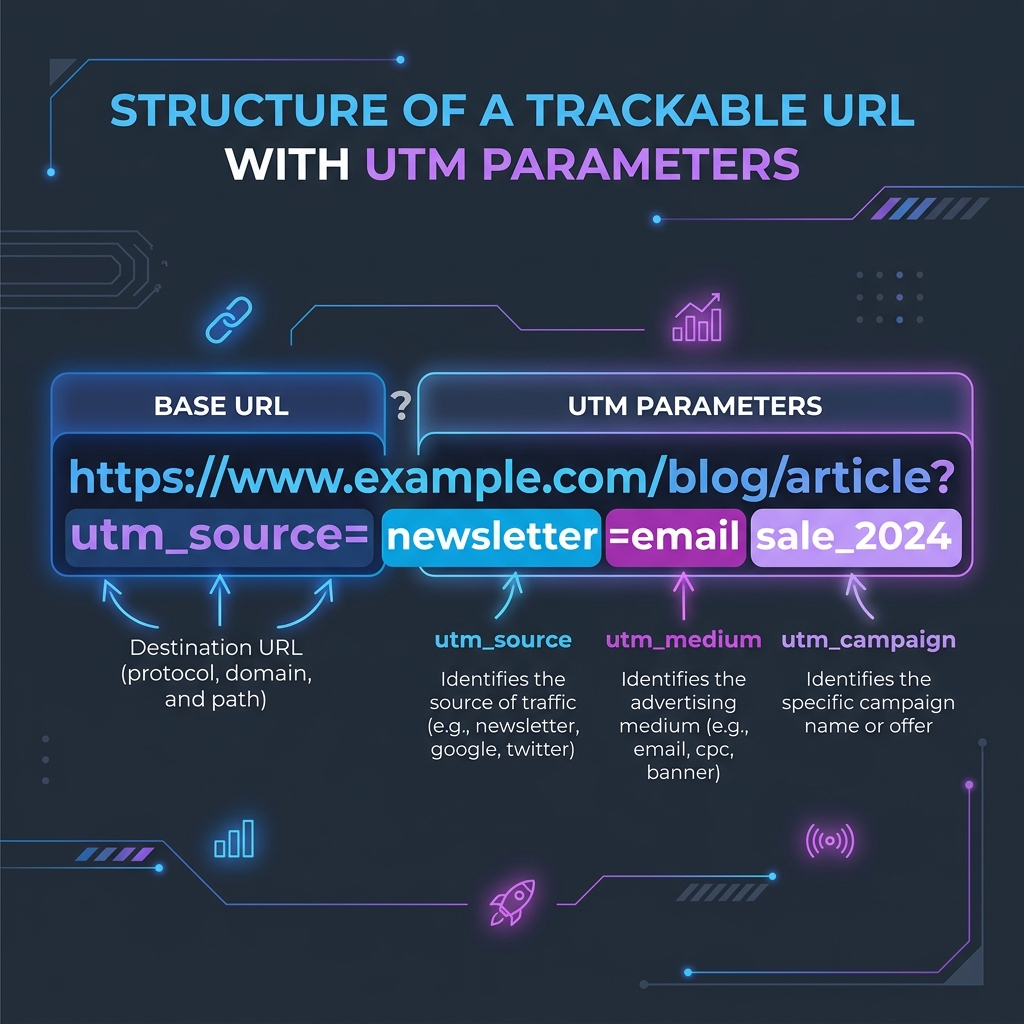
Deploying campaigns across ad networks requires custom tracking links. Here is how parameters are structured.
A UTM Link Builder is a marketing tool that appends standardized query parameters (like utm_source and utm_medium) to URLs. This allows Google Analytics to correctly identify incoming traffic referrers.
Managing multi-channel marketing campaigns requires tracking dozens or hundreds of unique URLs for newsletter links, paid ads, and social media creatives. Creating these links one-by-one is tedious and leads to copy-paste mistakes. Using a Bulk UTM Generator lets you build and format campaign links at scale.
Product-Led CTA: Formatting tracking URLs manually is slow and leads to broken links. Use our free, browser-based Campaign UTM Link Builder to generate campaign tracking parameters instantly.
⚡ Quick Action: Use the Online Tool
This guide pairs with our free, 100% secure client-side utility tool. Process your files or text instantly in-browser.
📐 How to Structure Bulk UTM Generation
To generate tracking links in bulk:
1. Define Your Base Templates: Create a structured list containing your destination URLs, campaign sources, mediums, and content tags.
2. Concatenate the Parameters: Join the base URL with your query parameters using the standard query string format:
$$\text{URL} = \text{Base} \mathbin{|} \text{"?"} \mathbin{|} \text{"utm_source="} \mathbin{|} \text{Source} \mathbin{|} \text{"\&utm_medium="} \mathbin{|} \text{Medium}$$
3. URL Encoding: Ensure all parameter values are URL-encoded, replacing spaces and special characters with their hexadecimal equivalents (e.g., %20 for spaces).
📊 Campaign Attribution Flow Reference
Below is a diagram illustrating the coordinate geometry of tracking parameters and analytics structures:
🛡️ Best Practices for Bulk Campaign Management
To maintain clean tracking data:
* Establish Naming Conventions: Define a clear naming convention for campaigns (e.g., YYYY_MM_LaunchName) so your analytics reports remain organized.
* Validate Final URLs: Before launching ads, test your generated links to ensure they redirect correctly and preserve the query parameters.
* Read UTM Parameter Naming Conventions and Facebook Ads UTM tracking self-referrals to learn more.
* Build clean tracking links instantly using our local Campaign UTM Link Builder.
Join the Urbandigistore Hub
Subscribe to receive premium developer cheat sheets, advanced conversion techniques, and campaign optimization checklists. Zero spam, unsubscribe anytime.
🚀 Launch Interactive Tool
Ready to test this directly? Open the secure web tool in a new sandbox tab.