
Demystifying UTM Parameters: Tracking the Source and Medium of Traffic
Discover the differences between campaign source and campaign medium, and learn how to construct clean, trackable URLs using UTM parameters.
🔧 Interactive Utility Tool
Try the free, 100% secure client-side tool associated with this guide. No registration required.
Demystifying UTM Parameters: Tracking Source & Medium
Attributing traffic source conversions accurately is vital for digital marketing campaigns. Here is a direct summary.
UTM parameters are five simple tags appended to a URL to track the effectiveness of digital campaigns. They tell tracking platforms like Google Analytics (GA4) exactly which source and medium drove the visit.
If you are running marketing campaigns across multiple networks (like email newsletters, Google Ads, or Facebook posts) without tracking tags, your analytics dashboard will pool all of them under generic "Direct" or "Referral" traffic. To identify exactly which ad or link generated a signup or purchase, you must use UTM parameters.
In this guide, we'll explain the structure of a tagged URL, break down the core parameters, and show you how to organize your tracking.
Product-Led CTA: Typing tracking tags manually is tedious and causes analytics self-referrals. Use our free, browser-compliant Campaign UTM Builder to compile standardized tracking URLs in seconds.
⚡ Quick Action: Use the Online Tool
This guide pairs with our free, 100% secure client-side utility tool. Process your files or text instantly in-browser.
📐 The Anatomy of a UTM-Tagged URL
A UTM (Urchin Tracking Module) code is a snippet of text appended to the end of a URL. Scanners and analytics platforms (like GA4) read these queries to categorize visitors.
Below is a visual layout breaking down the structural segments of a trackable link:
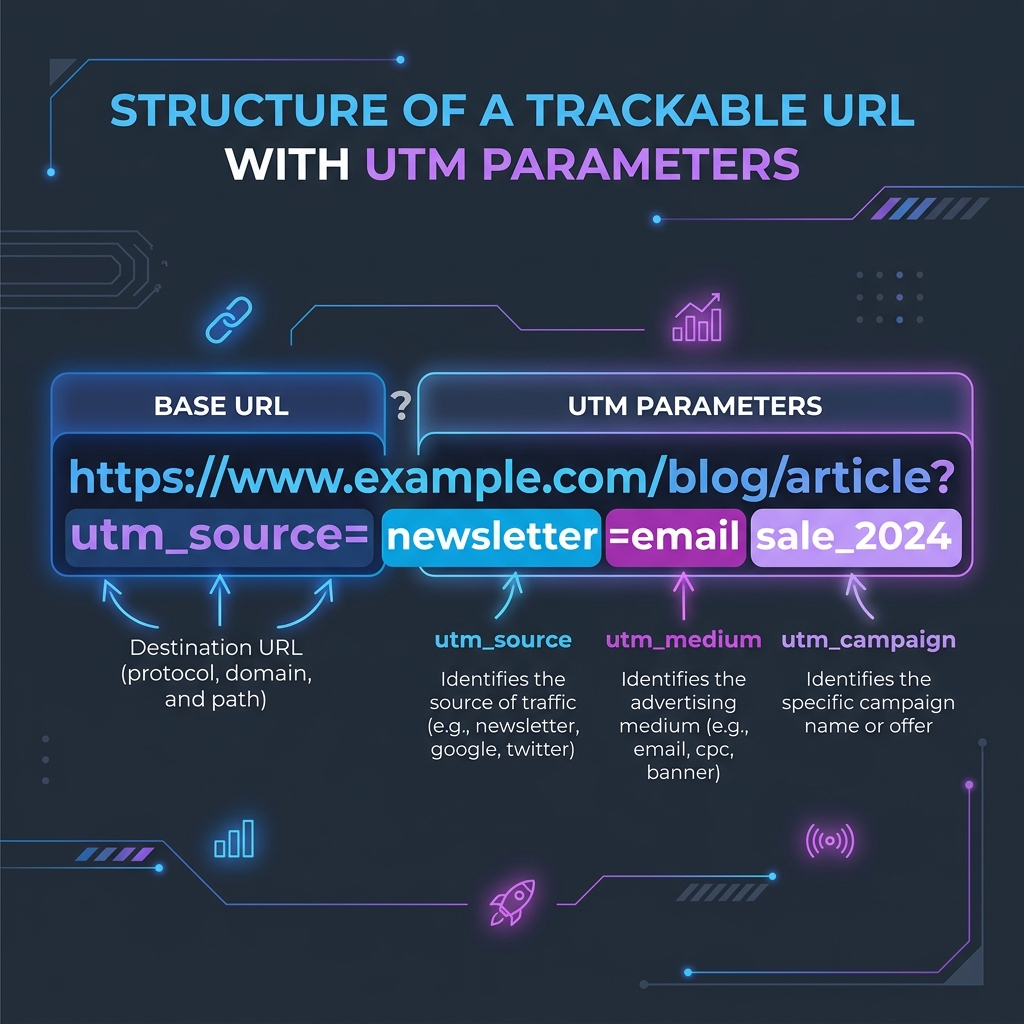
🔍 Source vs. Medium: What is the Difference?
The two most frequently confused parameters are utm_source and utm_medium. Keeping these separate is critical for clean analytics reports:
| Parameter | Purpose | Definition | Standard Examples |
|---|---|---|---|
utm_source |
Identifies the referrer | The specific platform or site sending the traffic. | google, facebook, newsletter, twitter |
utm_medium |
Identifies the marketing channel | The advertising medium or delivery model. | cpc (paid search), email, social, banner |
utm_campaign |
Identifies the promotion name | The specific marketing push or seasonal offer. | summer_sale_2026, product_launch |
🚦 Best Practices to Prevent Data Fragmentation
Google Analytics is case-sensitive. If you tag one link with utm_source=Facebook and another with utm_source=facebook, your dashboard will treat them as two separate sources.
- Always Use Lowercase: Force all campaign tags to lowercase to keep values uniform.
- Avoid Spaces: Spaces inside query strings can break URLs. Use underscores (
_) or hyphens (-) to separate words. - Format with a Builder: Avoid typing parameters manually. Use our client-side UTM Parameter Builder to generate links.
- (Read our guide on UTM Naming Conventions for detailed guidelines).
- Generate QR Codes: If running offline campaigns, you can paste your trackable link into our Custom QR Code Generator to bridge print to web.
Join the Urbandigistore Hub
Subscribe to receive premium developer cheat sheets, advanced conversion techniques, and campaign optimization checklists. Zero spam, unsubscribe anytime.
🚀 Launch Interactive Tool
Ready to test this directly? Open the secure web tool in a new sandbox tab.