
How to Generate Custom QR Codes: A Marketer's Guide to Tracking
Learn the anatomy of a QR Code, explore how Reed-Solomon error correction keeps codes readable under damage, and discover how to design custom tracki...
🔧 Interactive Utility Tool
Try the free, 100% secure client-side tool associated with this guide. No registration required.
How to Generate Custom QR Codes: A Marketer's Guide
Deploying custom QR codes in campaigns requires strict adherence to scanner specifications. Here is how grid contrast works.
A QR Code is a two-dimensional barcode storing data inside a grid of dark and light modules. Scanners decode this grid using error-correction math, allowing for fast scannability even when the code is partially damaged.
Quick Response (QR) codes have transitioned from simple inventory trackers to indispensable digital marketing assets. Whether placed on print advertising, product packaging, or restaurant tables, QR codes link offline physical audiences directly to digital platforms.
In this guide, we'll break down the anatomy of a QR code, explain how error correction works, and show you how to generate tracking-enabled QR codes for campaigns.
Product-Led CTA: Creating scannable QR codes requires compliant borders and high contrast. Generate web-ready graphics instantly using our free, browser-based Custom QR Code Generator with custom error correction.
⚡ Quick Action: Use the Online Tool
This guide pairs with our free, 100% secure client-side utility tool. Process your files or text instantly in-browser.
📐 The Anatomy of a QR Code
A QR code is a two-dimensional matrix barcode containing structured sections that scanners use to recognize, orient, and decode information:
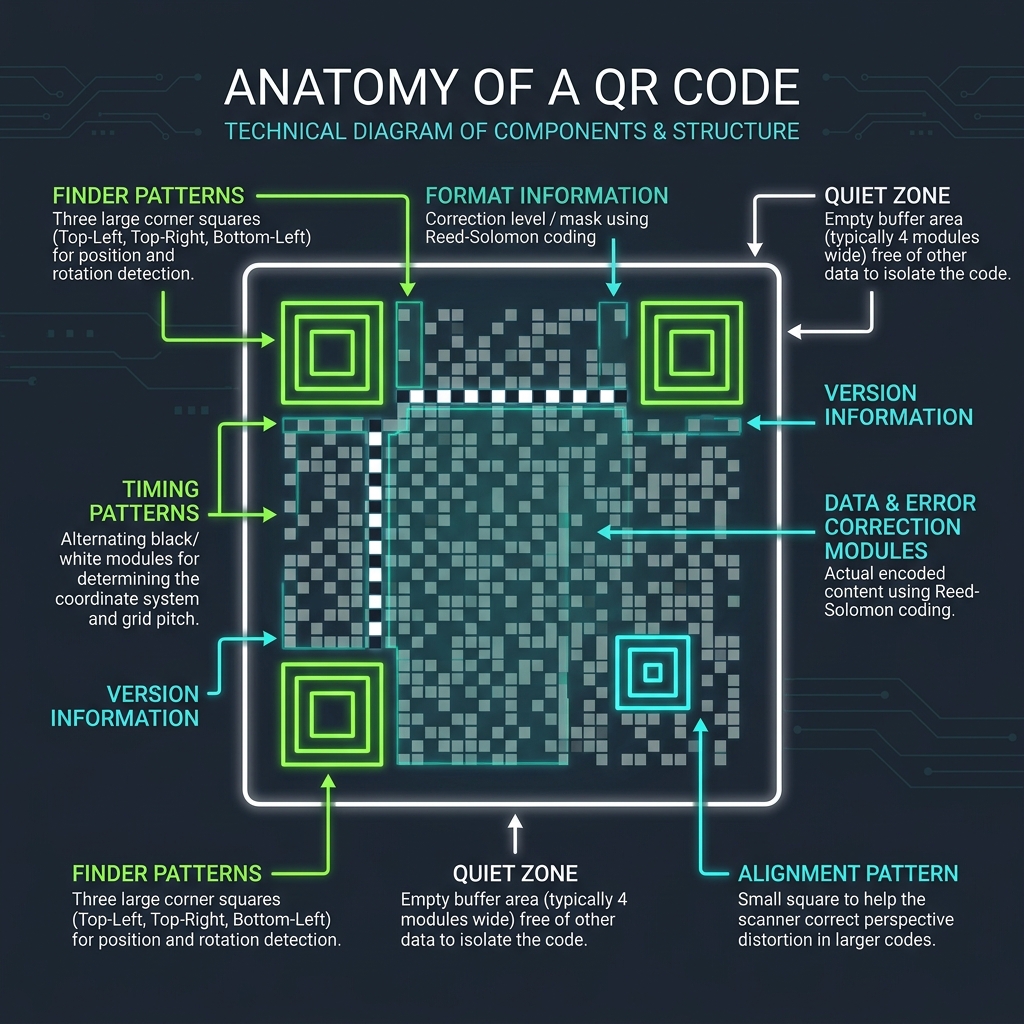
Key Structural Components:
- Finder Patterns: The three large concentric squares in the corners (top-left, top-right, bottom-left) that tell the scanner the orientation and boundaries of the code.
- Alignment Pattern: A smaller square that assists the scanner in correcting perspective distortion (crucial when scanning codes at an angle or on curved surfaces).
- Timing Patterns: Alternating black and white module lines connecting the finder patterns, used to configure the coordinate grid pitch.
- Quiet Zone: A white border (typically 4 modules wide) surrounding the code that insulates it from adjacent graphics.
🛠️ Understanding Reed-Solomon Error Correction
One of the most powerful features of QR codes is Error Correction. Using Reed-Solomon algebraic mathematical algorithms, QR codes can remain fully readable even if part of the code is smudged, torn, or covered by a custom logo.
There are four error correction levels:
| Level | Recovery Capacity | Use Case |
|---|---|---|
| Level L (Low) | ~7% of data recovered | Best for simple URLs, clean print, or minimizing code size. |
| Level M (Medium) | ~15% of data recovered | The standard default level; balances reliability and density. |
| Level Q (Quarter) | ~25% of data recovered | Good for environments where codes might get slightly scuffed. |
| Level H (High) | ~30% of data recovered | Best for custom branding. Allows you to overlay a logo in the center of the code. |
🎯 Generating Custom Tracking QR Codes
To measure print campaigns accurately in Google Analytics:
- Create a Tracking Link: Never encode a raw homepage URL. Use a Campaign UTM Builder to append traffic descriptors. (For naming guidelines, see our UTM Parameter Conventions Guide).
- Keep it Simple: The more text you pack into a QR code, the denser the grid becomes, making it harder for low-end phone cameras to focus. Use short tracking links or redirects.
- Generate the Code: Paste your URL into our client-side Custom QR Code Generator to select error correction strengths, custom colors, and sizes.
Join the Urbandigistore Hub
Subscribe to receive premium developer cheat sheets, advanced conversion techniques, and campaign optimization checklists. Zero spam, unsubscribe anytime.
🚀 Launch Interactive Tool
Ready to test this directly? Open the secure web tool in a new sandbox tab.