
Understanding HTTP Headers: Request and Response Meta-Data Explained
Learn how HTTP headers transmit critical request and response metadata between clients and servers, and discover how to inspect them.
Understanding HTTP Headers: Request and Response Meta-Data Explained
Looking for a secure way to analyze and optimize your workflows? Here is a quick reference guide on the subject.
PDF (Portable Document Format) is a digital document standard designed to preserve formatting across all devices. Modern PDF operations utilize local browser APIs to merge, split, or secure pages without server uploads, protecting document data.
When you load a webpage or make an API call, your browser doesn't just send the raw URL or receive the plain HTML file. It transmits a structured payload of HTTP Headers. HTTP headers are key-value metadata pairs that allow browsers and servers to negotiate formats, configure caching, manage session authentication, and enforce security policies.
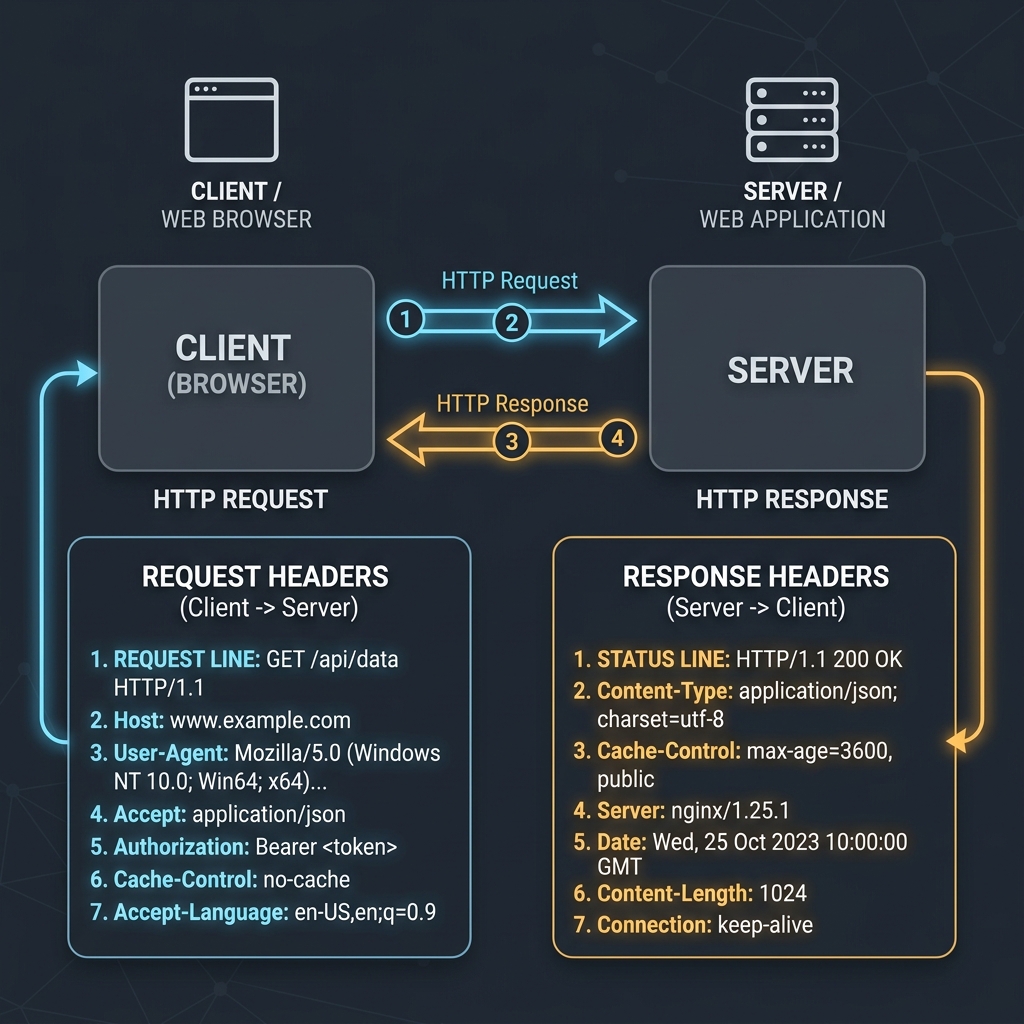
In this guide, we'll explain how HTTP headers are organized, explore common request and response parameters, and embed a visual cycle diagram.
Product-Led CTA: Uploading sensitive contracts to cloud services poses severe privacy risks. Use our free, local Merge PDF Documents Tool or Split PDF Pages Tool to compile and split pages safely in memory.
🚦 The HTTP Request-Response Cycle
Whenever a client requests resources from a web application, headers are passed on both ends of the connection:
🔍 Essential HTTP Request Headers (Client $\rightarrow$ Server)
These headers are sent by the web browser or API client to provide context about the request:
User-Agent: Identifies the client's operating system, browser, and rendering engine (e.g. Chrome on macOS).Content-Type: Tells the server the format of the request body (e.g.,application/jsonormultipart/form-data).Authorization: Passes security credentials or access tokens (e.g.,Bearer <JWT_Token>).Accept-Encoding: Informs the server which compression formats the browser supports (e.g.,gzip,br).
🛡️ Crucial HTTP Response Headers (Server $\rightarrow$ Client)
These headers are returned by the server to instruct the browser on how to handle the payload:
Content-Security-Policy (CSP): Restricts resource scopes to prevent Cross-Site Scripting (XSS) attacks. (Read our guide on Content Security Policy Implementation).Cache-Control: Directs caching systems on how long to store the response locally. (Read more in our HTTP Caching and ETag Guide).Access-Control-Allow-Origin: Configures CORS permissions to authorize cross-domain API requests. (See The Developer's Guide to CORS).Set-Cookie: Sends session data from the server to be stored in the browser's cookie storage. (Compare this with local structures in LocalStorage vs. Cookies).
🛠️ How to Inspect Headers in the Browser
To view headers on any live website: 1. Right-click the page and select Inspect to open Developer Tools. 2. Navigate to the Network tab. 3. Refresh the page and select any asset request (like the page HTML or an API call). 4. In the side panel, click Headers to view the raw request and response headers.
If you need to analyze JSON API headers, you can paste dynamic mock payloads directly into our JSON Structural Prettifier or decode binary representations using the Base64 File Converter.
Join the Urbandigistore Hub
Subscribe to receive premium developer cheat sheets, advanced conversion techniques, and campaign optimization checklists. Zero spam, unsubscribe anytime.