
Web Storage API vs. IndexedDB: A Detailed Local Storage Comparison
Deep dive into the client-side storage options available in modern browsers, comparing LocalStorage, SessionStorage, Cookies, and IndexedDB.
🔧 Interactive Utility Tool
Try the free, 100% secure client-side tool associated with this guide. No registration required.
Web Storage API vs. IndexedDB: A Local Storage Comparison
Looking for a secure way to analyze and optimize your workflows? Here is a quick reference guide on the subject.
Web developer utilities provide local data formatting and media conversion capabilities in the browser. Using modern client-side APIs ensures files are optimized and compared securely without sending data to servers.
Building rich, responsive web applications requires storing data directly in the browser. Storing resources locally allows developers to build offline-capable interfaces, maintain user state across sessions, and minimize server database calls.
Modern browsers support four primary storage mechanisms: Cookies, LocalStorage, SessionStorage, and IndexedDB. Choosing the wrong one can lead to performance degradation or critical XSS security vulnerabilities.
In this deep-dive guide, we will compare these storage models and outline when to use each.
Product-Led CTA: Need to format minified JSON, compare files, or convert media? Use our secure client-side JSON Formatter, Side-by-Side Diff Checker, Unix Timestamp Converter, HEIC to JPG Converter, or Image Compressor.
⚡ Quick Action: Use the Online Tool
This guide pairs with our free, 100% secure client-side utility tool. Process your files or text instantly in-browser.
📊 Browser Storage Technologies Matrix
Below is a detailed technical matrix comparing capacity, lifecycles, and security scopes across the storage models:
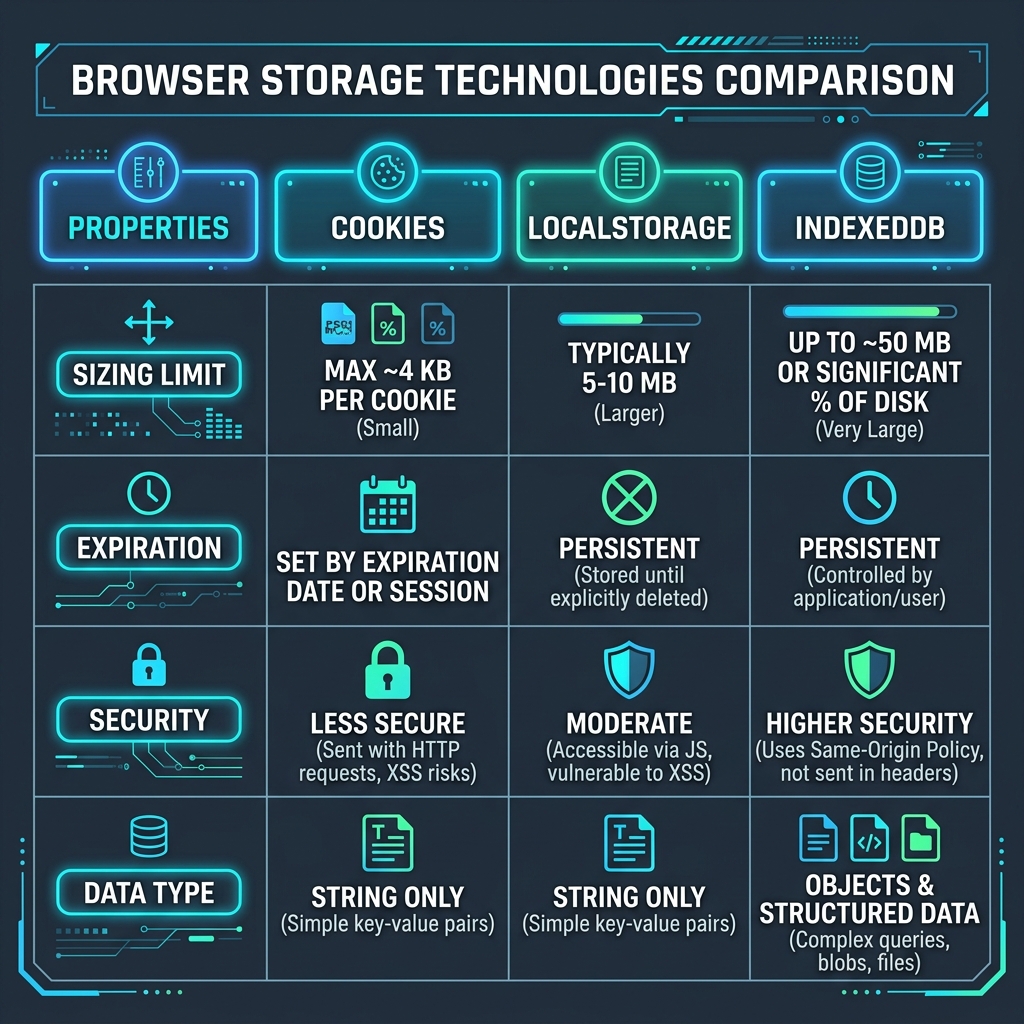
🚦 LocalStorage & SessionStorage: Key-Value Simplicity
The Web Storage API (consisting of LocalStorage and SessionStorage) is designed for simple, synchronous key-value storage.
Characteristics:
- Simple API: Extremely easy to use. Writing and reading values takes a single line of JavaScript (e.g.
localStorage.setItem('theme', 'dark')). - String Only: Only supports text string data. If you want to store a JSON object, you must serialize it using
JSON.stringify(), which incurs performance overhead for large objects. - Main Thread Block: All operations run synchronously. Reading/writing large strings can temporarily lock the browser's rendering thread.
🔍 IndexedDB: High-Performance Database
IndexedDB is a fully-featured, transactional NoSQL database built inside the browser container.
Characteristics:
- Asynchronous: All database transactions are event-driven, leaving the main thread completely responsive.
- Structured Storage: Handles complex JavaScript objects, Binary Arrays, file wicks, and
Blobitems natively. - Index Queries: Allows developers to define key indices, enabling search queries across millions of database records in milliseconds.
- (Read our complete guide to IndexedDB API Implementations).
🔒 Security Best Practices: Storing Tokens Securely
When choosing client-side storage, security should be your primary constraint:
- XSS Vulnerability: LocalStorage and SessionStorage are vulnerable to Cross-Site Scripting (XSS). Any script running on your origin can read all keys. Never store authentication tokens (like JWTs) in LocalStorage. (Read our guide on Cookies vs LocalStorage Security).
- HttpOnly Cookies: Store session tokens inside HTTP Cookies configured with
HttpOnlyandSecureflags. This restricts script access and blocks token theft. - Content Security Policy: Implement a strict CSP header to prevent unauthorized scripts from running on your application. (See Content Security Policy Guide).
For quick file encodings, you can use our client-side Base64 File Converter which processes assets locally in browser memory, bypassing server database storage entirely.
Join the Urbandigistore Hub
Subscribe to receive premium developer cheat sheets, advanced conversion techniques, and campaign optimization checklists. Zero spam, unsubscribe anytime.
🚀 Launch Interactive Tool
Ready to test this directly? Open the secure web tool in a new sandbox tab.