
Demystifying QR Code Masking: Balancing Scanning Speed and Contrast
Learn how QR code masking patterns prevent reading errors by balancing module layout, and explore how evaluation penalty scores optimize scans.
🔧 Interactive Utility Tool
Try the free, 100% secure client-side tool associated with this guide. No registration required.
Demystifying QR Code Masking: Optimizing Scans
Deploying custom QR codes in campaigns requires strict adherence to scanner specifications. Here is how grid contrast works.
A QR Code is a two-dimensional barcode storing data inside a grid of dark and light modules. Scanners decode this grid using error-correction math, allowing for fast scannability even when the code is partially damaged.
When generating a QR code, the encoder converts your URL into a grid of black and white cells (modules). However, if your data results in large clusters of dark blocks or long consecutive blank lines, camera scanners will struggle to orient themselves, causing reading delays or decode failures.
To prevent this, the QR specification requires Masking. In this guide, we'll explain how masking algorithms distribute modules, trace the evaluation formulas, and display a scannability comparison.
Product-Led CTA: Creating scannable QR codes requires compliant borders and high contrast. Generate web-ready graphics instantly using our free, browser-based Custom QR Code Generator with custom error correction.
⚙️ What is QR Code Masking?
Masking is the process of XORing (inverting) specific modules in the QR grid using mathematical formulas. The QR specification defines 8 standard masking patterns (Mask 0 through Mask 7).
⚡ Quick Action: Use the Online Tool
This guide pairs with our free, 100% secure client-side utility tool. Process your files or text instantly in-browser.
Each mask uses a different modulo formula to decide which cells to invert based on their grid coordinates $(i, j)$: * Mask 0: $(i + j) \pmod 2 = 0$ * Mask 1: $i \pmod 2 = 0$ * Mask 4: $((i / 2) + (j / 3)) \pmod 2 = 0$
The generator applies all 8 masks to the raw data grid, calculates a penalty score for each, and selects the mask with the lowest score (highest scannability).
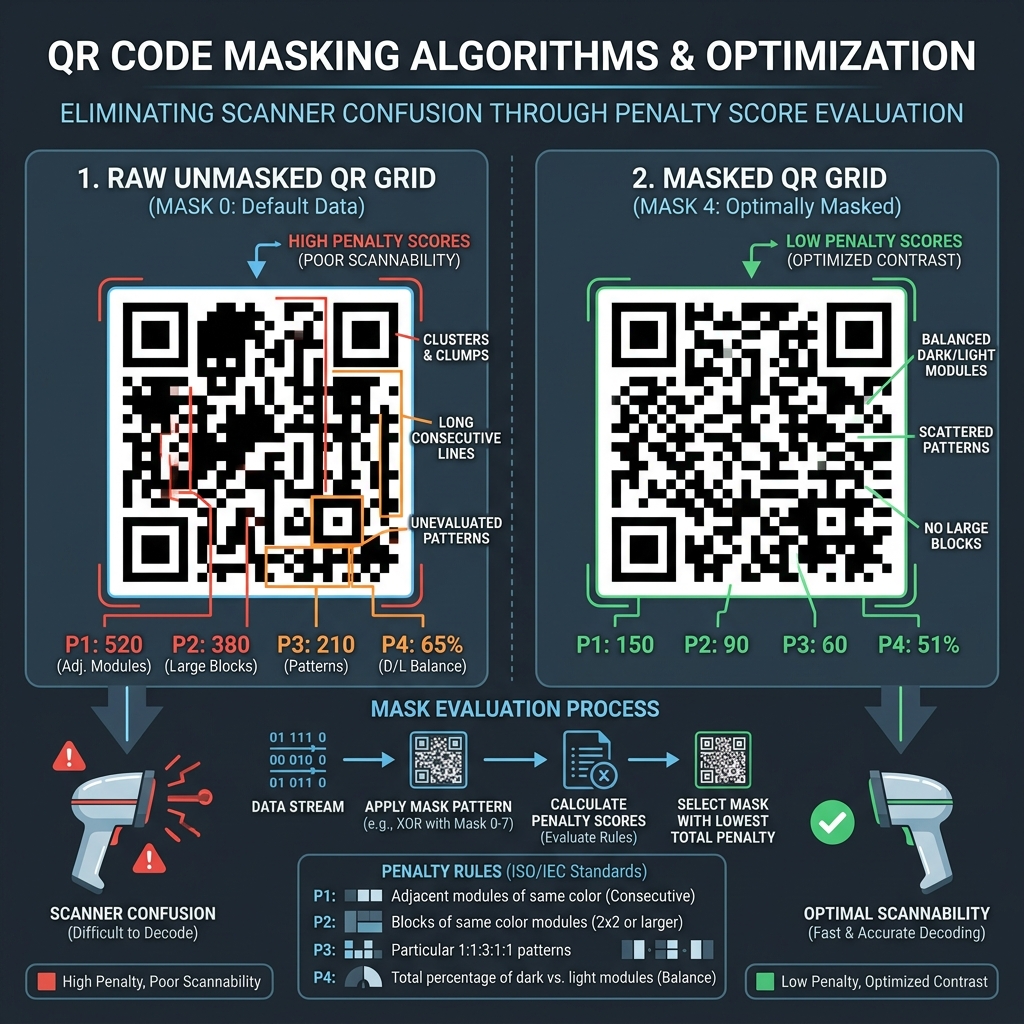
📊 Masking Optimization and Penalty Infographic
Below is a technical comparison illustrating how a raw unmasked grid is optimized through masking to eliminate scanner confusion:
📐 How Penalty Scores are Evaluated
The generator evaluates each masked grid against four ISO/IEC penalty rules:
- Rule 1 (Consecutive Modules): Penalizes long horizontal or vertical runs of 5 or more modules of the same color.
- Rule 2 (Blocks of Color): Penalizes $2 \times 2$ or larger solid blocks of the same color.
- Rule 3 (Finder-like Patterns): Penalizes layouts that resemble the finder patterns (which can confuse the scanner's search orientation).
- Rule 4 (Dark/Light Balance): Penalizes grids where the total ratio of dark modules deviates significantly from 50%.
🎯 Optimization Strategies for Marketers
To ensure high readability: * Use High Error Correction: When overlaying logos in the center, select Error Correction Level H (30% recovery) to let the masking algorithm compensate around the graphic. (Read our QR Code Anatomy Guide). * Shorten URLs: Dense grids are harder to resolve. Format links using a UTM Parameter Builder first, then shorten them before generating. * Generate Locally: Use our client-side Custom QR Code Generator to select error correction levels and compute scannable codes.
Join the Urbandigistore Hub
Subscribe to receive premium developer cheat sheets, advanced conversion techniques, and campaign optimization checklists. Zero spam, unsubscribe anytime.
🚀 Launch Interactive Tool
Ready to test this directly? Open the secure web tool in a new sandbox tab.