
How to Merge PDF Documents Online Without Uploading to a Server
Learn how to consolidate multiple PDF documents completely inside your browser memory, ensuring your confidential data never reaches external servers.
🔧 Interactive Utility Tool
Try the free, 100% secure client-side tool associated with this guide. No registration required.
How to Merge PDF Documents Online Without Uploading to a Server
Managing digital documents requires strict compliance with formatting and font subsets. Here is a direct definition of this standard.
PDF (Portable Document Format) is a digital document standard designed to preserve formatting across all devices. Modern PDF operations utilize local browser APIs to merge, split, or secure pages without server uploads, protecting document data.
Merging PDF documents is a daily task in modern offices, school settings, and software operations. However, most free online PDF tools require you to upload your files to their external servers. If your documents contain sensitive personal information (like bank statements, contracts, or identification cards), uploading them introduces severe privacy and security risks.
In this guide, we'll explain how to merge PDF files locally using browser-based client-side technologies, and show you how to do it securely.
Product-Led CTA: Uploading sensitive contracts to cloud services poses severe privacy risks. Use our free, local Merge PDF Documents Tool or Split PDF Pages Tool to compile and split pages safely in memory.
🔒 The Privacy-First PDF Merger Model
Traditional PDF converters act as intermediaries: you upload files to their servers, their backend runs processing scripts, and you download the consolidated output.
Modern web standards enable a client-side processing model instead. Using libraries like pdf-lib compiled into WebAssembly or pure JavaScript:
1. Your browser loads the processing library once.
2. You select your target files locally.
3. The browser reads the raw bytes, extracts the pages, and compiles the new PDF container directly in your device's memory.
4. Zero bytes are transmitted over the internet.
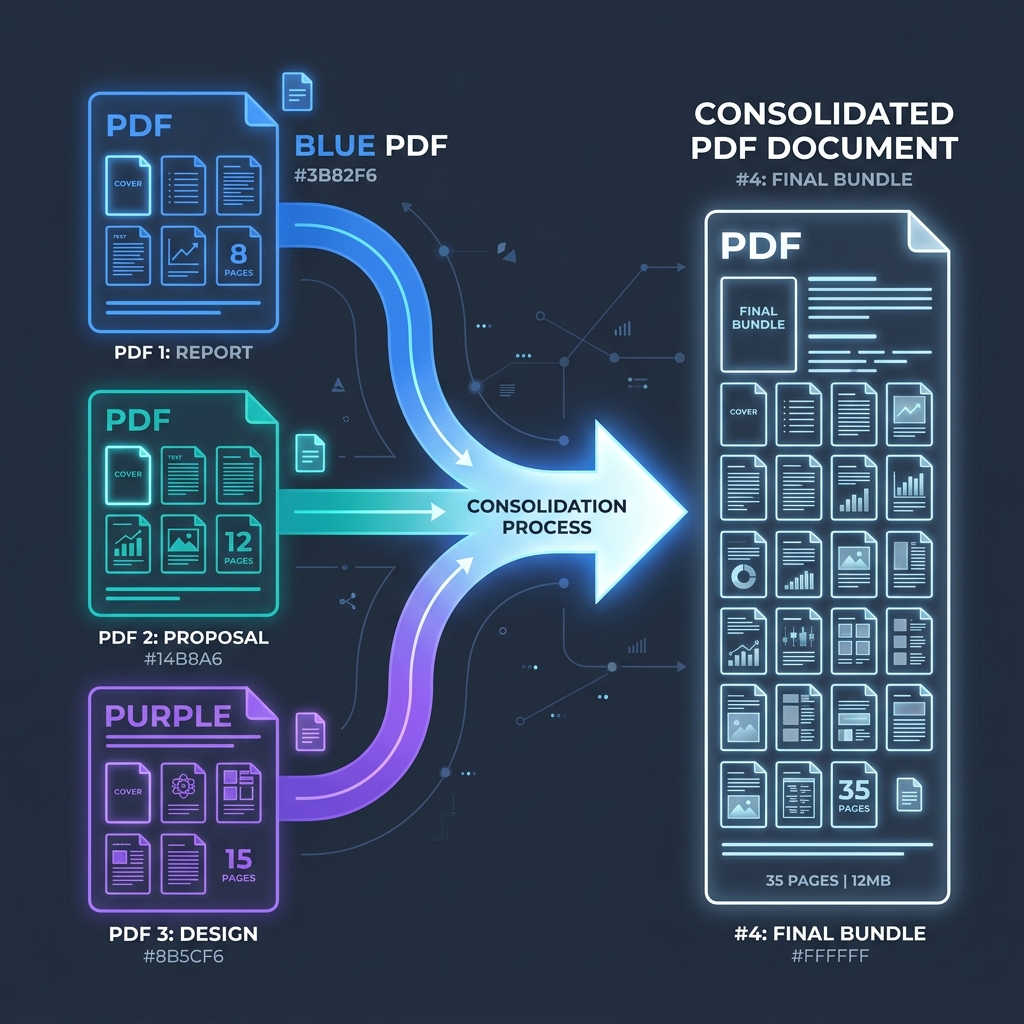
📊 Client-Side PDF Consolidation Diagram
Below is a flow diagram illustrating how independent documents are read, aligned, and consolidated entirely in client-side memory:
⚡ Quick Action: Use the Online Tool
This guide pairs with our free, 100% secure client-side utility tool. Process your files or text instantly in-browser.
🛠️ Implementing Client-Side PDF Merging in JavaScript
If you're a developer, you can implement client-side PDF merging on your own website with this simple code:
```javascript import { PDFDocument } from 'pdf-lib';
async function mergePdfFiles(pdfBufferList) { // Create a new empty PDF container const mergedPdf = await PDFDocument.create();
for (const pdfBytes of pdfBufferList) { // Parse the current PDF buffer const pdfDoc = await PDFDocument.load(pdfBytes);
// Copy all pages from the parsed document
const copiedPages = await mergedPdf.copyPages(pdfDoc, pdfDoc.getPageIndices());

// Append the pages to the main container
copiedPages.forEach((page) => mergedPdf.addPage(page));
}
// Serialize the consolidated PDF to bytes const mergedPdfBytes = await mergedPdf.save(); return mergedPdfBytes; } ```
🚦 Choosing the Right PDF Utility
When organizing your files, select the appropriate client-side tool for the job:
- To join files together: Use our secure Merge PDF Documents Tool to group multiple sheets or invoices into a single bundle.
- To separate pages: Use our Split PDF Pages Tool to pull out a single sheet or split an annual report into parts.
- (Read our companion guide on How to Split PDF Pages Safely for a deep dive on extraction math).
For other client-side operations, you can convert images using our Image Converter or decode structures natively using the Base64 File Converter.
Join the Urbandigistore Hub
Subscribe to receive premium developer cheat sheets, advanced conversion techniques, and campaign optimization checklists. Zero spam, unsubscribe anytime.
🚀 Launch Interactive Tool
Ready to test this directly? Open the secure web tool in a new sandbox tab.