
WhatsApp Link Generator: Click-to-Chat QR Code Print Marketing Strategies
Discover how to combine WhatsApp direct chat wa.me links with custom printed QR codes to drive offline retail customer acquisition.
🔧 Interactive Utility Tool
Try the free, 100% secure client-side tool associated with this guide. No registration required.
WhatsApp Link Generator: QR Code Print Marketing
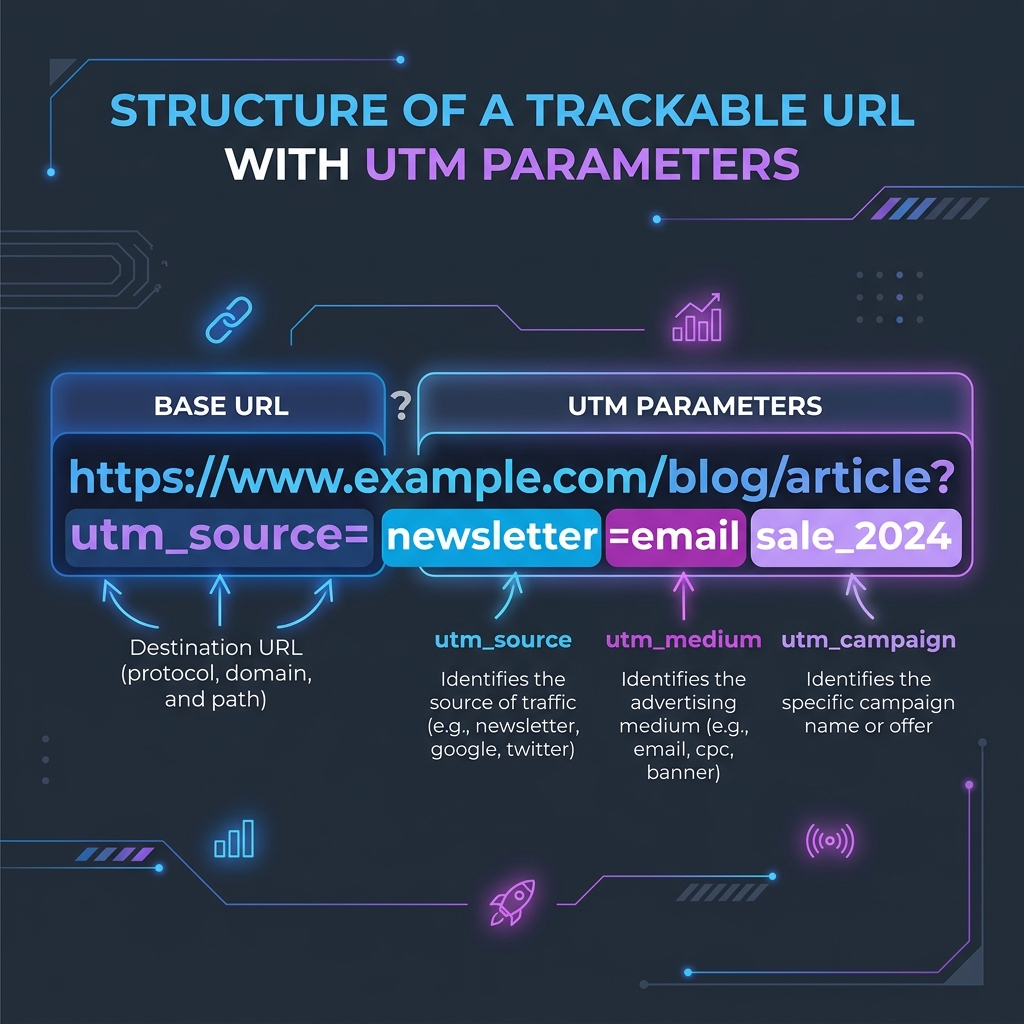
Deploying campaigns across ad networks requires custom tracking links. Here is how parameters are structured.
A WhatsApp link builder is a marketing utility that formats phone numbers with country prefixes into direct wa.me chat URLs. This enables users to start an instant chat without saving numbers.
For retail stores, physical restaurants, and local service providers, bridging the gap between offline customers and digital channels is key. Combining a WhatsApp Link Generator with a high-resolution printed QR code allows customers to scan packaging, menus, or receipts to start a direct chat with your support team instantly.
Product-Led CTA: Creating wa.me URLs manually is slow and leads to broken links. Use our free, browser-based WhatsApp Link Generator to generate link prefixes instantly.
⚡ Quick Action: Use the Online Tool
This guide pairs with our free, 100% secure client-side utility tool. Process your files or text instantly in-browser.
📐 Combining wa.me Links with QR Codes
To launch an offline QR-code-to-chat campaign:
1. Format the URL: Generate a wa.me URL with a pre-filled, localized message (e.g., https://wa.me/15550192834?text=Hi!%20I'd%20like%20to%20place%20an%20order).
2. Generate a High-Resolution QR Code: Convert the URL into a high-DPI vector QR code to ensure it prints sharply on packaging.
3. Optimize the Scan Area: Add a clear call-to-action border around the printed QR code (e.g., "Scan to order via WhatsApp").
📊 Campaign Attribution Flow Reference
Below is a campaign tracking layout demonstrating parameter structures and attribution flows:
🛡️ Offline Print Marketing Guidelines
To optimize printed QR campaigns: * Test Scan Dimensions: Ensure the printed QR code is at least $2 \times 2\text{ cm}$ ($0.8 \times 0.8\text{ inches}$) to guarantee standard smartphone cameras can focus on it easily. * Establish a Quiet Zone: Keep a clean margin around the printed QR code to prevent design elements from interfering with scanning. * Read WhatsApp Naming Strategies and Why is my QR code blurry to optimize your campaign configurations. * Format your direct URLs instantly using our local WhatsApp Link Generator.
Join the Urbandigistore Hub
Subscribe to receive premium developer cheat sheets, advanced conversion techniques, and campaign optimization checklists. Zero spam, unsubscribe anytime.
🚀 Launch Interactive Tool
Ready to test this directly? Open the secure web tool in a new sandbox tab.