
Demystifying QR Code Error Correction: Levels L, M, Q, and H Explained
Learn how Reed-Solomon error correction keeps QR codes scannable even when damaged, and explore levels L, M, Q, and H.
🔧 Interactive Utility Tool
Try the free, 100% secure client-side tool associated with this guide. No registration required.
Demystifying QR Code Error Correction: Levels Explained
Deploying custom QR codes in campaigns requires strict adherence to scanner specifications. Here is how grid contrast works.
A QR Code is a two-dimensional barcode storing data inside a grid of dark and light modules. Scanners decode this grid using error-correction math, allowing for fast scannability even when the code is partially damaged.
One of the key features that makes QR codes superior to legacy barcodes is their ability to withstand physical damage. Even if a QR code is printed on a shipping box that gets torn, dirty, or wet, smartphone cameras can still scan it. This resilience is powered by Reed-Solomon Error Correction.
In this guide, we'll explain how error correction operates, detail the four levels (L, M, Q, H), and review scannability rules.
Product-Led CTA: Creating scannable QR codes requires compliant borders and high contrast. Generate web-ready graphics instantly using our free, browser-based Custom QR Code Generator with custom error correction.
📐 Reed-Solomon Mathematical Recovery
The QR code generator converts your url into data blocks, and then calculates backup data called Error Correction Codewords using polynomial division. This mathematical formula is known as the Reed-Solomon algorithm.
⚡ Quick Action: Use the Online Tool
This guide pairs with our free, 100% secure client-side utility tool. Process your files or text instantly in-browser.
When a scanner reads a QR code, if dirt or damage covers part of the modules: * The scanner detects the errors. * It solves the Reed-Solomon polynomial equations using the backup codewords to recalculate the missing or corrupted data modules.
📊 QR Code Structure Reference
Scanners read the backup codewords by identifying formatting parameters stored in the version modules. Here is a reference diagram highlighting these structural coordinates:
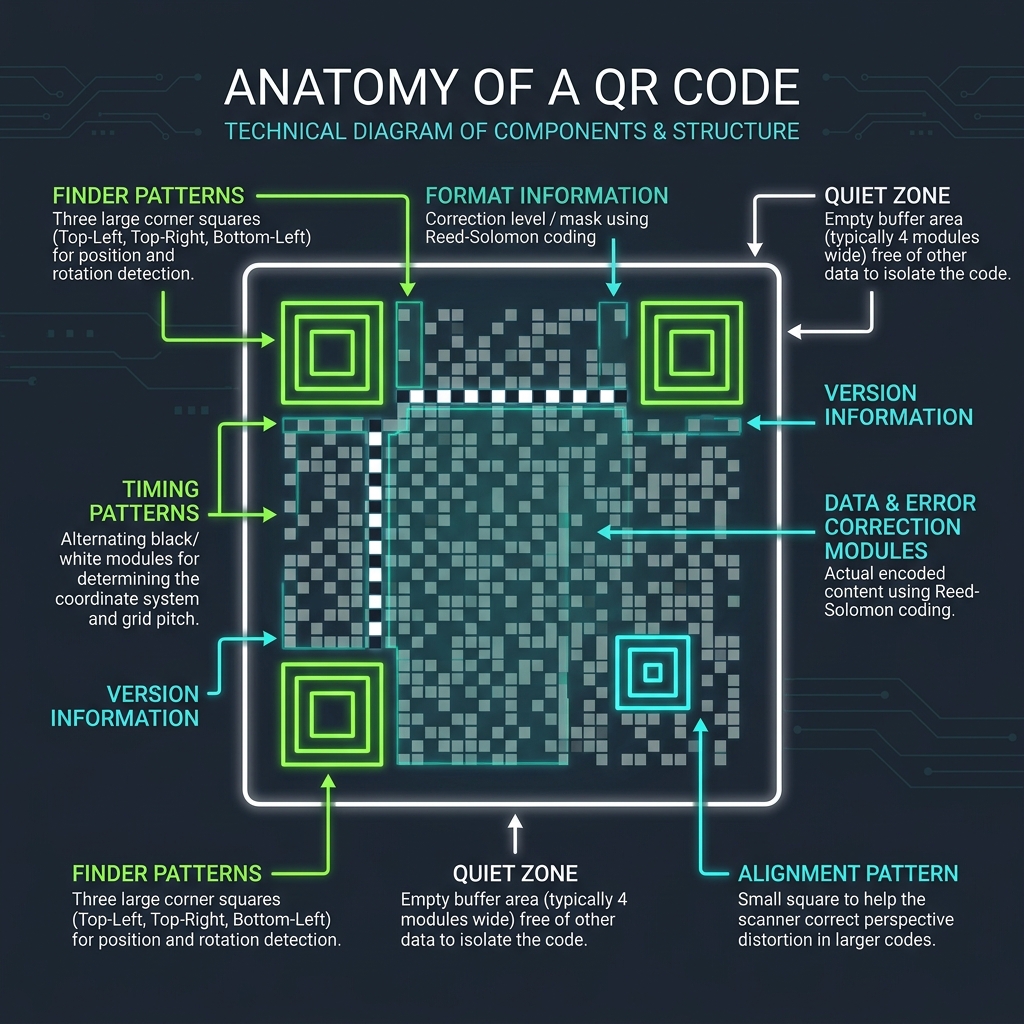
🔢 The Four Error Correction Levels
The QR code specification defines four standard levels of error correction, allowing designers to trade data capacity for durability:
- Level L (Low): Recovers up to 7% of damaged modules. Best for clean, digital screens where data capacity is critical.
- Level M (Medium): Recovers up to 15% of damaged modules. The standard default for general marketing.
- Level Q (Quartile): Recovers up to 25% of damaged modules. Recommended for high-wear environments (like shipping labels or outdoor flyers).
- Level H (High): Recovers up to 30% of damaged modules. Required if you place a custom logo in the center of the grid, as the logo blocks some of the data modules.
🎨 Best Practices for Styling Custom Codes
To ensure scanning reliability:
- Url Length Bounds: If you select Level H error correction, the grid density grows significantly. Keep url lengths short by using a Campaign UTM Generator first, then shorten the link.
- (See our QR Code Naming & Campaign Tracking Guide for details).
- Quiet Zone Border: Ensure a clear border margin is maintained on all sides. (See QR Code Quiet Zones Guide).
- Create Custom QR Codes: Paste your link into our browser-based Custom QR Code Generator to select error correction levels and compile clean, scannable files.
Join the Urbandigistore Hub
Subscribe to receive premium developer cheat sheets, advanced conversion techniques, and campaign optimization checklists. Zero spam, unsubscribe anytime.
🚀 Launch Interactive Tool
Ready to test this directly? Open the secure web tool in a new sandbox tab.