
Demystifying QR Code Version Scaling: Grid Capacity and Module Sizing Rules
Learn how QR code versions scale from Version 1 to 40, examine the grid formula, and discover how version increments expand data capacity.
🔧 Interactive Utility Tool
Try the free, 100% secure client-side tool associated with this guide. No registration required.
Demystifying QR Code Version Scaling & Sizing Rules
Deploying custom QR codes in campaigns requires strict adherence to scanner specifications. Here is how grid contrast works.
A QR Code is a two-dimensional barcode storing data inside a grid of dark and light modules. Scanners decode this grid using error-correction math, allowing for fast scannability even when the code is partially damaged.
A QR code is a grid of dark and light modules that stores encoded binary payload data. Rather than using a fixed layout, the QR code standard defines 40 different versions. As the volume of data to be encoded increases, the QR code generator scales up the version, creating a larger grid with more modules to handle the additional information.
In this guide, we'll write out the grid scaling formula, analyze data capacities, and trace version layout rules.
Product-Led CTA: Creating scannable QR codes requires compliant borders and high contrast. Generate web-ready graphics instantly using our free, browser-based Custom QR Code Generator with custom error correction.
📐 The Grid Dimension Sizing Formula
The grid size (width and height in modules) scales linearly with the version number:
$$\text{Dimension (modules)} = 4 \times (\text{Version} - 1) + 21$$
⚡ Quick Action: Use the Online Tool
This guide pairs with our free, 100% secure client-side utility tool. Process your files or text instantly in-browser.
Where: * Version 1: The smallest standard grid. The formula yields $4 \times (1-1) + 21 = \mathbf{21 \times 21}$ modules. * Version 2: Yields $4 \times (2-1) + 21 = \mathbf{25 \times 25}$ modules. * Version 40: The largest standard grid. The formula yields $4 \times (40-1) + 21 = \mathbf{177 \times 177}$ modules.
Each step up in version adds exactly 4 modules to each side of the grid, accommodating more data.
📊 QR Code Grid Sizing Reference
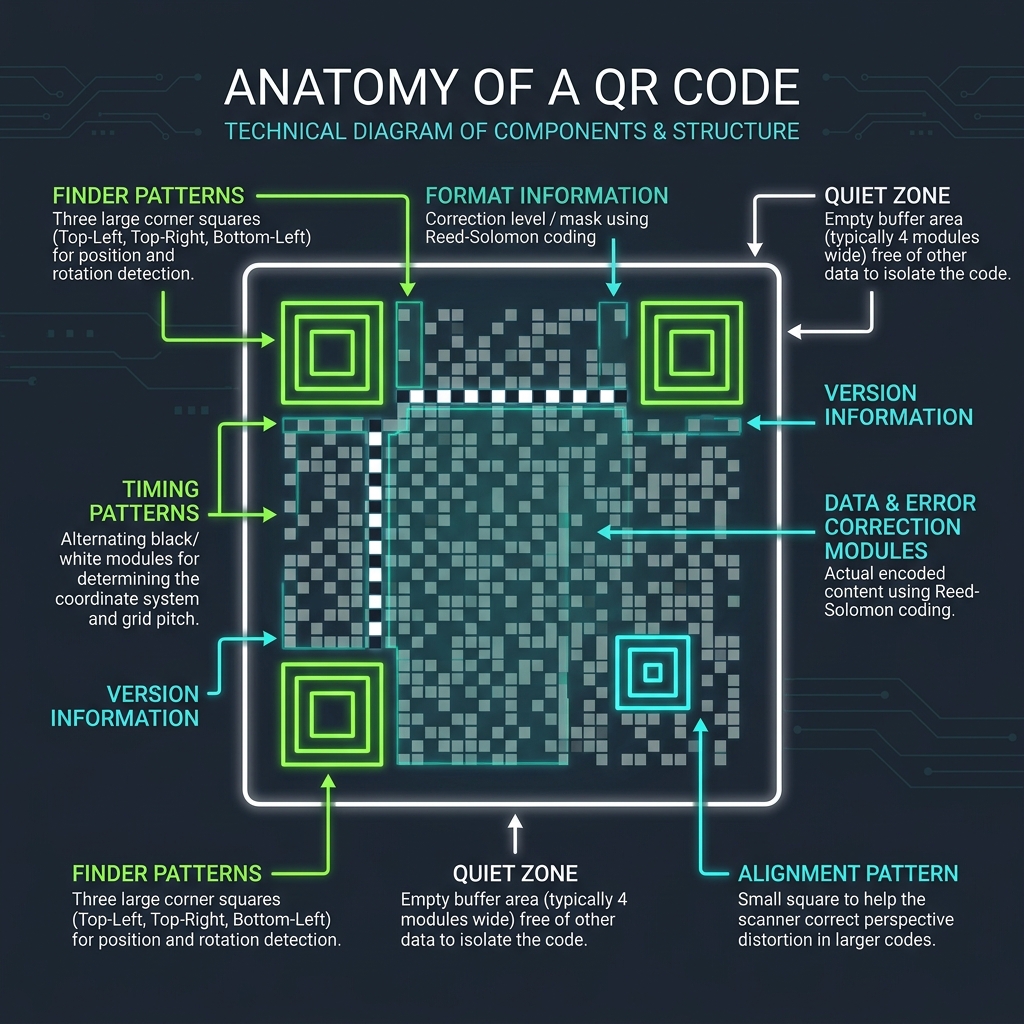
Below is a technical layout illustrating the structural elements (finder patterns, alignment patterns, and clock tracks) that guide scanners across different grid sizes:
⚙️ Capacity Scaling and Alignment Marks
As the version scales up: * Alignment Patterns: Version 1 has no alignment patterns. As grid dimensions exceed $25 \times 25$ modules, the generator inserts small $5 \times 5$ alignment squares. Version 40 uses a grid of 49 alignment patterns to prevent scanning distortion. * Data Capacity: The data capacity depends on both the version and the error correction level. For example, at Error Correction Level L (lowest redundancy): * Version 1: Stores up to 17 alphanumeric characters. * Version 10: Stores up to 652 alphanumeric characters. * Version 40: Stores up to 4,296 alphanumeric characters. * (Read our QR Code Error Correction Guide to review Reed-Solomon redundancy levels).
🚦 Generating Web-Optimized QR Codes
To generate clean, scannable codes: * Keep Data Densities Low: Shorten urls using a Campaign UTM Generator before encoding. (See QR Code Naming & Campaign Tracking Guide for details). * Create Custom QR Codes: Paste your link into our browser-based Custom QR Code Generator to select error correction levels and compile clean, scannable files.
Join the Urbandigistore Hub
Subscribe to receive premium developer cheat sheets, advanced conversion techniques, and campaign optimization checklists. Zero spam, unsubscribe anytime.
🚀 Launch Interactive Tool
Ready to test this directly? Open the secure web tool in a new sandbox tab.