
Demystifying QR Code Versions: Data Capacity and Grid Dimensions
Learn how QR code versions define grid sizes and data capacity, and discover how error correction shapes code density.
🔧 Interactive Utility Tool
Try the free, 100% secure client-side tool associated with this guide. No registration required.
Demystifying QR Code Versions: Capacity & Grid Size
Deploying custom QR codes in campaigns requires strict adherence to scanner specifications. Here is how grid contrast works.
A QR Code is a two-dimensional barcode storing data inside a grid of dark and light modules. Scanners decode this grid using error-correction math, allowing for fast scannability even when the code is partially damaged.
When generating a QR code, you might notice that some codes have clean, simple grids, while others are dense and complex. The density of a QR code is determined by its Version. The QR code specification includes 40 distinct versions, each defining a specific grid size and data capacity.
In this guide, we'll explain how QR versions scale, trace data capacities, and show how error correction levels affect grid density.
Product-Led CTA: Creating scannable QR codes requires compliant borders and high contrast. Generate web-ready graphics instantly using our free, browser-based Custom QR Code Generator with custom error correction.
📐 QR Code Grid Dimensions by Version
Each QR code version increases the grid size by 4 modules (dots) on each side. The formula to calculate the grid size (width and height in modules) for any version $V$ is:
$$\text{Grid Size} = 21 + 4 \times (V - 1)$$
⚡ Quick Action: Use the Online Tool
This guide pairs with our free, 100% secure client-side utility tool. Process your files or text instantly in-browser.
- Version 1: The smallest version. Uses a $21 \times 21$ module grid (441 total dots).
- Version 4: Uses a $33 \times 33$ module grid (1,089 total dots).
- Version 10: Uses a $57 \times 57$ module grid (3,249 total dots).
- Version 40: The largest version. Uses a $177 \times 177$ module grid (31,329 total dots).
As the version number increases, the grid density grows, allowing the code to hold more characters.
📊 QR Code Structure Reference
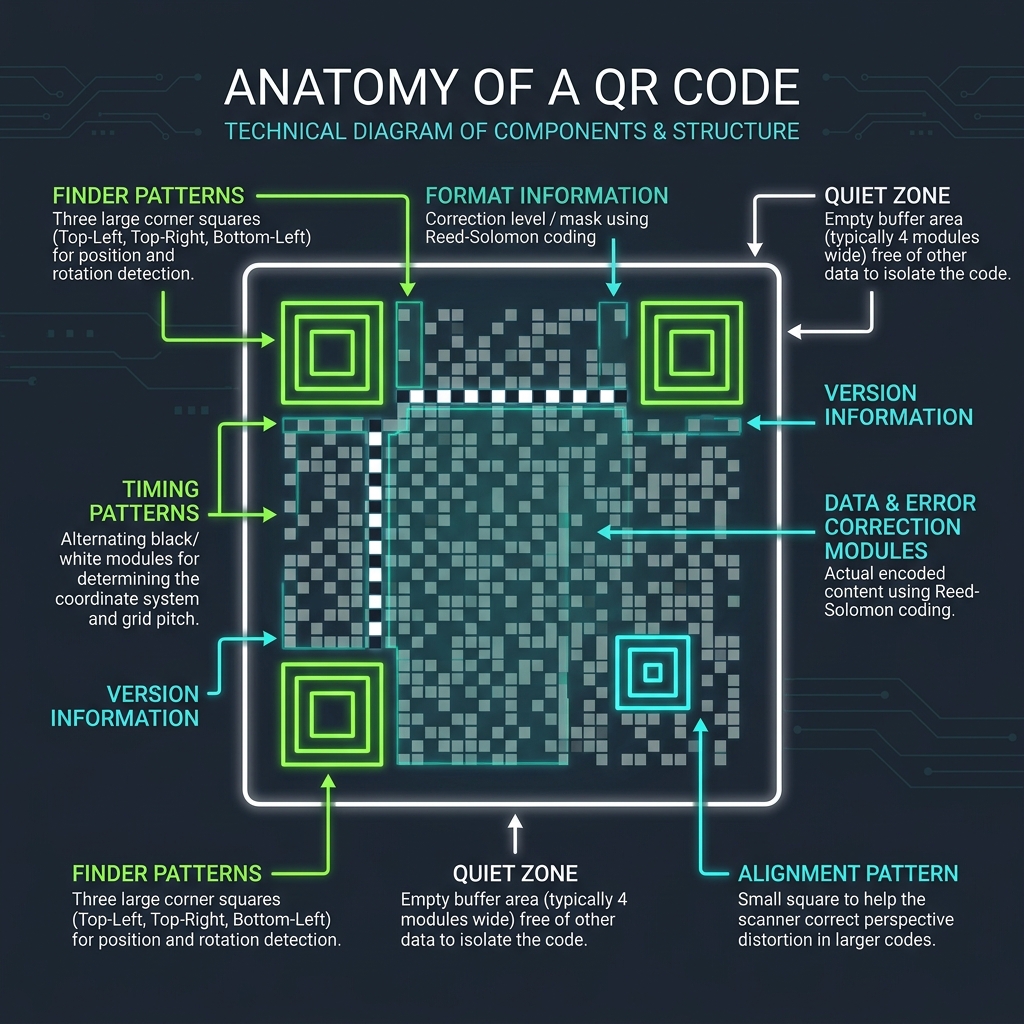
Scanners read the data modules by identifying finder patterns and alignment squares. Here is a reference diagram highlighting these structural coordinates:
🔢 Data Capacity and Error Correction Trade-Offs
The total characters a QR code can hold depends on both the version and the Error Correction Level (L, M, Q, H). Higher error correction capacity reserves more modules for backup data, reducing the remaining capacity for your text:
| QR Version | Error Correction Level | Numeric Capacity | Alphanumeric Capacity |
|---|---|---|---|
| Version 1 | Level L (7% recovery) | 41 characters | 25 characters |
| Version 1 | Level H (30% recovery) | 17 characters | 10 characters |
| Version 4 | Level L (7% recovery) | 187 characters | 114 characters |
| Version 4 | Level H (30% recovery) | 80 characters | 48 characters |
If you encode a long URL with Level H error correction, the generator automatically increments the QR version to fit the data, resulting in a denser grid.
🎯 Optimization Rules for Clean Scans
To make your QR codes easy to scan: 1. Shorten Your Destination Link: Use a Campaign UTM Generator to tag your campaigns, and then use a short URL to keep the QR version low (ideally Version 1 to 4). 2. (See our QR Code Naming & Campaign Tracking Guide for details). 3. Choose Proper Masks: Let the generator optimize module distribution to prevent scanning errors. (See QR Masking Algorithms Guide). 4. Create Custom QR Codes: Paste your link into our browser-based Custom QR Code Generator to select error correction levels and compile clean, scannable files.
Join the Urbandigistore Hub
Subscribe to receive premium developer cheat sheets, advanced conversion techniques, and campaign optimization checklists. Zero spam, unsubscribe anytime.
🚀 Launch Interactive Tool
Ready to test this directly? Open the secure web tool in a new sandbox tab.