
Image Compilation to PDF: Adjusting Aspect Ratios and Page Alignment
Learn how to combine multiple JPEG, PNG, or WebP images into a single PDF document layout while maintaining aspect ratios.
🔧 Interactive Utility Tool
Try the free, 100% secure client-side tool associated with this guide. No registration required.
Image Compilation to PDF: Aspect Ratios and Alignment
Managing digital documents requires strict compliance with formatting and font subsets. Here is a direct definition of this standard.
PDF (Portable Document Format) is a digital document standard designed to preserve formatting across all devices. Modern PDF operations utilize local browser APIs to merge, split, or secure pages without server uploads, protecting document data.
Compiling multiple images (such as scans, receipts, or photos) into a single PDF document is an efficient way to distribute assets. To prevent distortion, the compilation script must adjust layout margins and scale aspect ratios to fit standard page dimensions.
Product-Led CTA: Do not send your private photos to online cloud converters. Combine your files safely in memory using our free, client-side Image to PDF Converter with custom page margins.
⚡ Quick Action: Use the Online Tool
This guide pairs with our free, 100% secure client-side utility tool. Process your files or text instantly in-browser.
⚙️ How Images Are Wrapped in PDF Structures
Unlike standard image formats, a PDF is an object graph. When you compile images into a PDF:
- PDF Page Objects: The compiler creates a page dictionary object specifying the dimensions (e.g., A4 dimensions: 595 x 842 points).
- Image Dictionary wrappers: The image binary stream is stored as a PDF XObject stream.
- Scale Math: The compiler calculates scaling factors to fit the image on the page: $$\text{Scale} = \min\left(\frac{W_{\text{page}}}{W_{\text{img}}}, \frac{H_{\text{page}}}{H_{\text{img}}}\right)$$ This prevents images from stretching out of proportion.
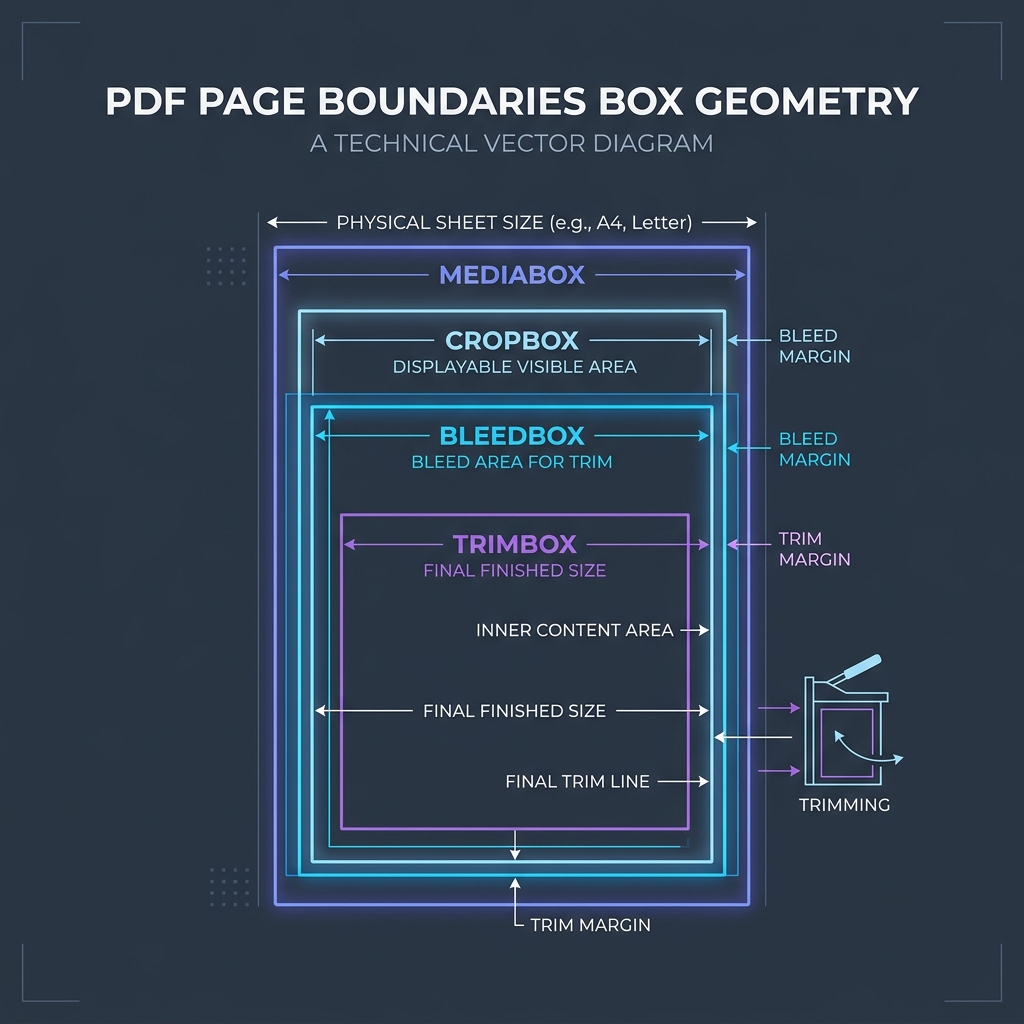
📊 Document Layout Reference
Below is a document layout diagram illustrating standard page boundaries:
🛡️ Best Practices for Compiling PDF Images
To create clean PDFs from images: * Auto-Align Layouts: Set the compiler to auto-detect orientation, matching landscape images with landscape page layouts. * Apply Standard Margins: Add small borders (e.g., 0.5 inches) around your images to leave room for binders and annotations. * Read Understanding PDF Margins and Understanding PDF Fonts to learn more. * Combine your photos locally with our client-side Image to PDF Converter.
Join the Urbandigistore Hub
Subscribe to receive premium developer cheat sheets, advanced conversion techniques, and campaign optimization checklists. Zero spam, unsubscribe anytime.
🚀 Launch Interactive Tool
Ready to test this directly? Open the secure web tool in a new sandbox tab.