
Understanding PDF Font Embedding: Standard 14 Fonts and Font Subsetting
Learn how PDF font embedding works, explore the Standard 14 core fonts, and discover how font subsetting optimizes file size.
🔧 Interactive Utility Tool
Try the free, 100% secure client-side tool associated with this guide. No registration required.
PDF Font Embedding: Standard 14 and Subsetting
Managing digital documents requires strict compliance with formatting and font subsets. Here is a direct definition of this standard.
PDF (Portable Document Format) is a digital document standard designed to preserve formatting across all devices. Modern PDF operations utilize local browser APIs to merge, split, or secure pages without server uploads, protecting document data.
When programmatically generating or merging PDF documents, text formatting must remain identical across all platforms. If a user opens your PDF on an iPad, a Windows laptop, or an Android phone, they expect to see the exact same typography. Ensuring this requires an understanding of PDF Font Embedding and file size optimization.
In this guide, we'll explain the Standard 14 fonts, font embedding options, and the mechanics of font subsetting.
Product-Led CTA: Uploading sensitive contracts to cloud services poses severe privacy risks. Use our free, local Merge PDF Documents Tool or Split PDF Pages Tool to compile and split pages safely in memory.
🏛️ The Core Standard 14 Fonts
In the early days of the PDF specification, embedding font binary files (like TrueType or OpenType files) made documents extremely heavy. To solve this, Adobe defined the Standard 14 Fonts (also called Core Fonts).
PDF viewer software is guaranteed to supply these standard font families locally:
- Helvetica (Regular, Bold, Oblique, Bold-Oblique)
- Times-Roman (Regular, Bold, Italic, Bold-Italic)
- Courier (Regular, Bold, Oblique, Bold-Oblique)
- Symbol
- ZapfDingbats
If your PDF uses only these 14 fonts, you do not need to embed any font files, keeping your PDF file size extremely small.
⚡ Quick Action: Use the Online Tool
This guide pairs with our free, 100% secure client-side utility tool. Process your files or text instantly in-browser.
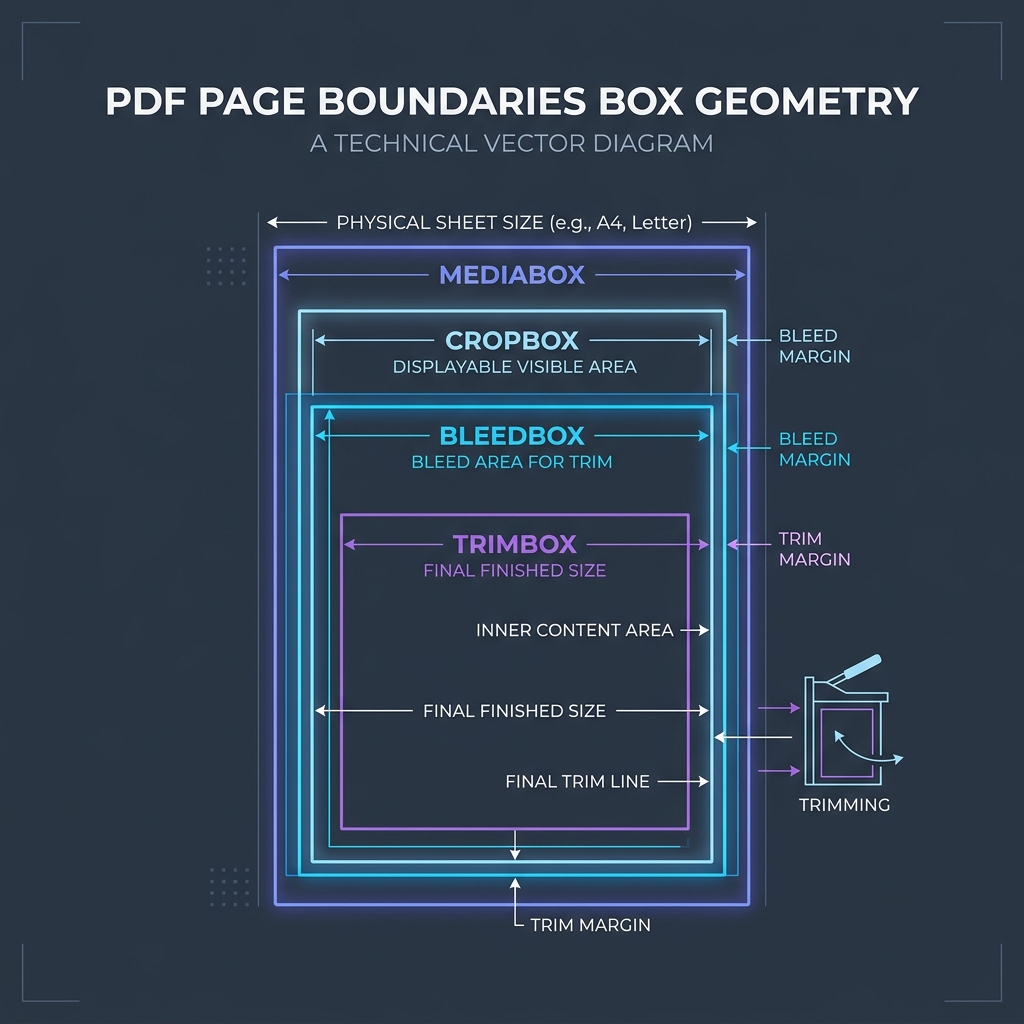
📊 Document Layout Geometry Reference
To understand page structure coordinates where custom embedded fonts are rendered, refer to the PDF page boundaries diagram below:
⚙️ Full Embedding vs. Font Subsetting
If you use custom brand fonts (e.g. Montserrat or Playfair), you must choose how to package them inside the PDF stream:
1. Full Embedding
This embeds the entire .ttf or .otf file in the PDF catalog. This is the safest way to ensure compatibility, but it bloats the document size (adding 500KB to 2MB per font style).
2. Font Subsetting (Recommended)
Subsetting extracts and embeds only the glyphs used in the text. For example, if your document only contains the title "Urban Digi Store", the subsetting engine will discard all other letters (like 'q', 'x', 'z'), punctuation, and foreign symbols. * Result: Reduces the embedded font payload from 1MB to just 15KB. * Drawback: Makes the PDF file harder to edit later, because missing characters cannot be typed without re-embedding the font.
🚦 Optimizing Document Assembly
When processing PDFs: * To join documents together: Use our client-side Merge PDF Documents Tool which aggregates font dictionaries without duplicating resources. * To extract pages: Use our browser Split PDF Pages Tool to extract target pages while preserving font subsets.
To learn more about document dimensions, read Understanding PDF Document Margins or check out How to Split PDFs Locally.
Join the Urbandigistore Hub
Subscribe to receive premium developer cheat sheets, advanced conversion techniques, and campaign optimization checklists. Zero spam, unsubscribe anytime.
🚀 Launch Interactive Tool
Ready to test this directly? Open the secure web tool in a new sandbox tab.