
Understanding PDF Document Margins: Margin Guidelines for Clean Layouts
Learn how PDF document margins are structured, and find spacing guidelines to ensure clean document printing and viewing layouts.
🔧 Interactive Utility Tool
Try the free, 100% secure client-side tool associated with this guide. No registration required.
Understanding PDF Document Margins: Spacing Guidelines
Managing digital documents requires strict compliance with formatting and font subsets. Here is a direct definition of this standard.
PDF (Portable Document Format) is a digital document standard designed to preserve formatting across all devices. Modern PDF operations utilize local browser APIs to merge, split, or secure pages without server uploads, protecting document data.
When designing or programmatically generating PDF files, selecting the correct page margins is crucial. Margins prevent text from being cut off during printing and ensure a clean, professional layout. To manage this spacing, developers use specific Page Boundary Boxes defined in the PDF specification.
Product-Led CTA: Uploading sensitive contracts to cloud services poses severe privacy risks. Use our free, local Merge PDF Documents Tool or Split PDF Pages Tool to compile and split pages safely in memory.
📐 The Five PDF Page Boundary Boxes
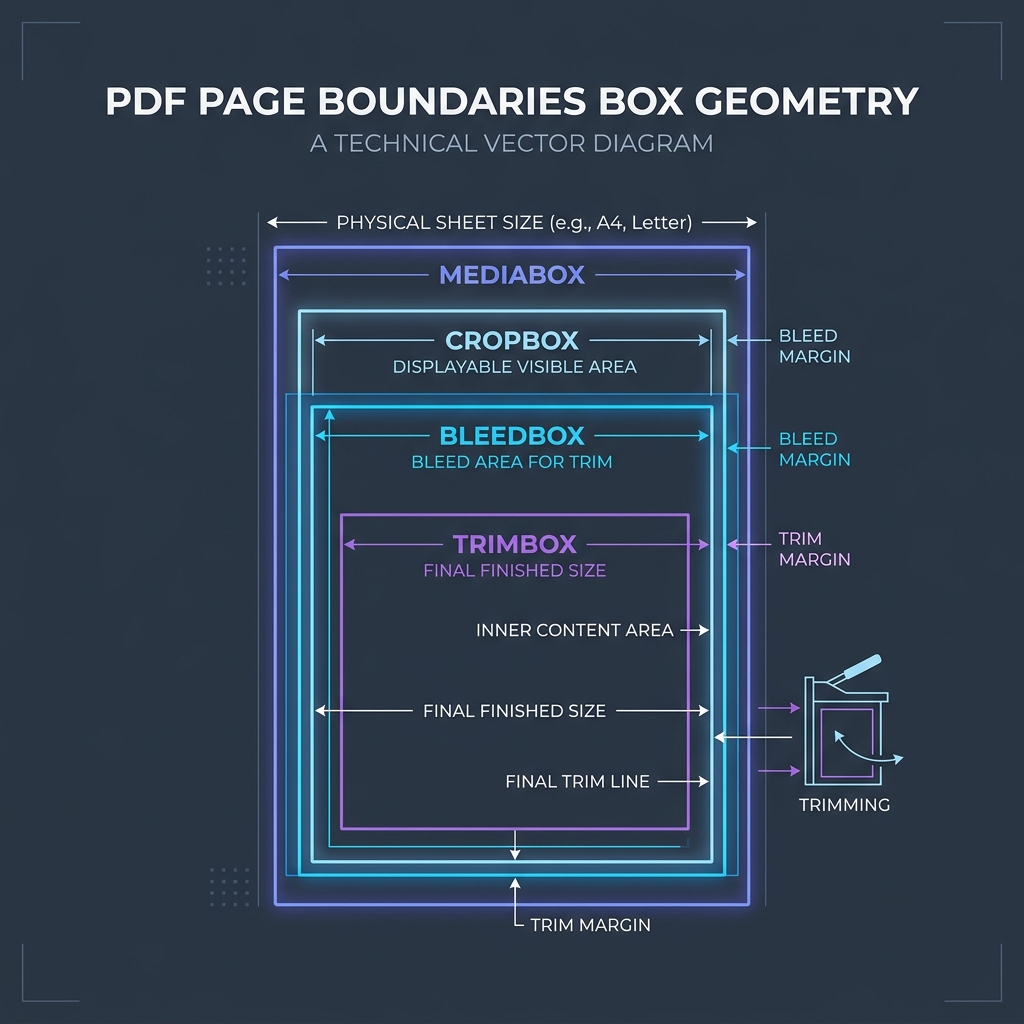
The PDF specification defines five distinct boundary boxes that control document margins and page dimensions:
⚡ Quick Action: Use the Online Tool
This guide pairs with our free, 100% secure client-side utility tool. Process your files or text instantly in-browser.
- MediaBox: The physical page size (e.g., US Letter or A4).
- CropBox: The visible page area displayed in PDF viewers.
- TrimBox: The final dimensions of the printed page after trimming.
- BleedBox: The boundary for content (like background colors) that extends past the page edge.
- ArtBox: The area containing the main content of the page.
For standard documents, these boxes are typically set in points (72 points = 1 inch), with a standard margin of 0.5 to 0.75 inches (36 to 54 points) on all sides.
📊 PDF Page Geometry Boundaries Reference
Below is a diagram illustrating the coordinate layout of these boundary boxes:
🛠️ Best Practices for Page Layouts
To ensure clean formatting across all devices: * Keep Content Inside the Safe Zone: Ensure all critical text and graphics remain within the TrimBox. * Use Standard Page Sizes: Standardize on A4 (595 x 842 points) or Letter (612 x 792 points) to avoid scaling issues. * To learn more, read Understanding PDF Margins & Geometry and PDF Page Margin Coordinates. * Combine and split pages safely using our browser-based Merge PDF and Split PDF tools.
Join the Urbandigistore Hub
Subscribe to receive premium developer cheat sheets, advanced conversion techniques, and campaign optimization checklists. Zero spam, unsubscribe anytime.
🚀 Launch Interactive Tool
Ready to test this directly? Open the secure web tool in a new sandbox tab.