
Understanding PDF Document Linearization: The Fast Web View Standard
Learn how PDF linearization restructures files to support Fast Web View, allowing browsers to stream pages efficiently.
🔧 Interactive Utility Tool
Try the free, 100% secure client-side tool associated with this guide. No registration required.
Understanding PDF Linearization: Fast Web View
Managing digital documents requires strict compliance with formatting and font subsets. Here is a direct definition of this standard.
PDF (Portable Document Format) is a digital document standard designed to preserve formatting across all devices. Modern PDF operations utilize local browser APIs to merge, split, or secure pages without server uploads, protecting document data.
When users click to open a multi-megabyte PDF on a website, they don't want to wait for the entire file to download before seeing the first page. By default, standard PDFs store cross-reference tables and resource catalogs at the end of the file. This forces browsers to download the entire binary blob before rendering. To solve this, developers use PDF Linearization, commonly known as Fast Web View.
In this guide, we'll explain linearized file structures, trace byte streaming, and analyze layout bounds.
Product-Led CTA: Uploading sensitive contracts to cloud services poses severe privacy risks. Use our free, local Merge PDF Documents Tool or Split PDF Pages Tool to compile and split pages safely in memory.
🏛️ How Standard PDFs Compare to Linearized PDFs
The arrangement of dictionary objects within the binary payload dictates download requirements:
📦 1. Standard PDF Structure
In a standard PDF, the file catalog and cross-reference table (xref) are appended at the bottom. A browser cannot render Page 1 without parsing the catalog to locate pages and resources.
* Result: The user sees a blank loading indicator until the entire file (100% of bytes) is downloaded.
⚡ Quick Action: Use the Online Tool
This guide pairs with our free, 100% secure client-side utility tool. Process your files or text instantly in-browser.
📦 2. Linearized PDF Structure (Fast Web View)
A linearized PDF restructures the file objects to place Page 1 resources at the top of the byte stream: * Linearization Dictionary: Appended near the top of the file, declaring that the PDF is linearized. * First-Page Offset Tables: Provides byte offsets for Page 1 resources immediately. * Page 1 Objects: Page stream, fonts, and images for the first page are placed next. * Remainder of the Document: Subsequent pages and the main cross-reference index follow. * The Streaming Effect: When loading a linearized PDF via HTTP, the web browser reads the initial bytes, renders Page 1 immediately, and downloads the remaining pages in the background as the user scrolls.
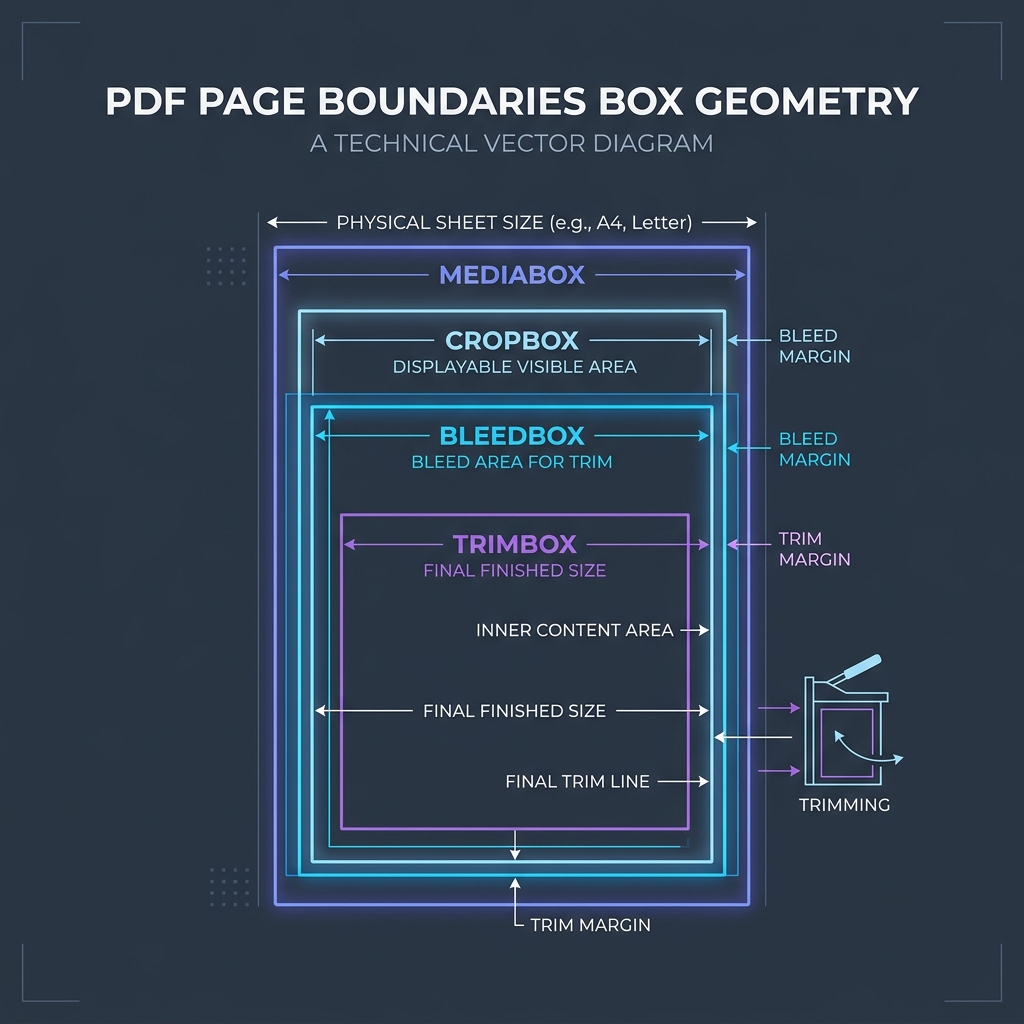
📊 Document Layout Geometry Reference
To understand page coordinate dimensions where streaming text and custom elements are rendered, refer to the page boundaries diagram below:
⚙️ How to Linearize PDFs
You can optimize files during compilation or as a post-processing step:
* CLI Tools: Use open-source tools like qpdf or pdftoppm with the linearization flag:
qpdf --linearize input.pdf output.pdf
* Server-Side Libraries: Many server frameworks support enabling Fast Web View in their output settings.
🚦 Streamlining Your PDF Assembly
Managing optimized document processing requires client-side security: * To join documents together: Use our client-side Merge PDF Documents Tool which aggregates pages locally without sending files to external servers. * To extract pages: Use our browser Split PDF Pages Tool to extract target pages while preserving optimized structural schemas.
To learn more about document dimensions, read Understanding PDF Document Margins or check out How to Split PDFs Locally.
Join the Urbandigistore Hub
Subscribe to receive premium developer cheat sheets, advanced conversion techniques, and campaign optimization checklists. Zero spam, unsubscribe anytime.
🚀 Launch Interactive Tool
Ready to test this directly? Open the secure web tool in a new sandbox tab.