
Understanding PDF Metadata: Document Info and XMP Metadata
Learn how PDF metadata is structured, explore the difference between Info dictionaries and XMP streams, and discover how to manage metadata.
🔧 Interactive Utility Tool
Try the free, 100% secure client-side tool associated with this guide. No registration required.
Understanding PDF Metadata: Info Dicts and XMP Streams
Managing digital documents requires strict compliance with formatting and font subsets. Here is a direct definition of this standard.
PDF (Portable Document Format) is a digital document standard designed to preserve formatting across all devices. Modern PDF operations utilize local browser APIs to merge, split, or secure pages without server uploads, protecting document data.
Every PDF file contains metadata that describes its properties—such as the author, creation date, keywords, and the software used to compile it. This information is critical for search engine optimization (SEO), document archiving, and automated indexing. In the PDF specification, metadata is stored in two distinct formats: the legacy Document Info Dictionary and the modern XMP Metadata Stream.
In this guide, we'll explain both formats, map their schemas, and inspect coordinate layouts.
Product-Led CTA: Uploading sensitive contracts to cloud services poses severe privacy risks. Use our free, local Merge PDF Documents Tool or Split PDF Pages Tool to compile and split pages safely in memory.
🏛️ Legacies vs. Modern Metadata Formats
PDF engines must support both metadata stores to maintain backwards compatibility:
📦 1. The Document Info Dictionary (Legacy)
The Info dictionary is a simple key-value structure containing standard fields:
* /Title: The name of the document.
* /Author: The person or organization that created it.
* /CreationDate: The timestamp when the document was compiled (formatted as D:YYYYMMDDHHmmSSOHH'mm').
* /Producer: The software that converted the content into a PDF.
⚡ Quick Action: Use the Online Tool
This guide pairs with our free, 100% secure client-side utility tool. Process your files or text instantly in-browser.
📦 2. The XMP Metadata Stream (Modern)
Introduced in PDF 1.4, the Extensible Metadata Platform (XMP) embeds metadata as an XML stream using the W3C Resource Description Framework (RDF).
* Structure: Stored inside the PDF Catalog dictionary under the /Metadata key.
* Advantage: Because XMP is standard XML, external indexers (like search engine crawlers) can read document metadata without parsing the rest of the binary PDF container.
📊 Document Layout Geometry Reference
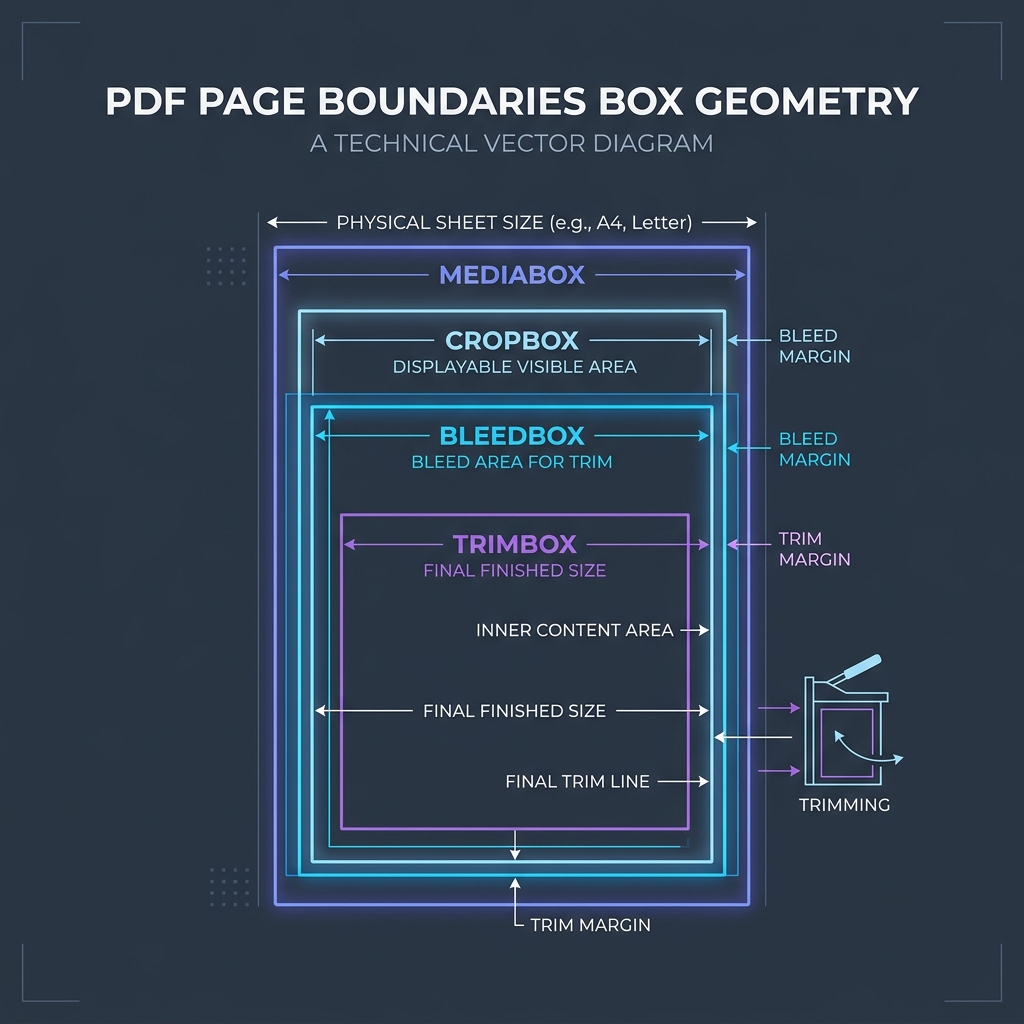
To understand page dimensions where document details and titles are rendered, refer to the PDF page boundaries diagram below:
⚙️ Merging and Stripping Metadata
When processing PDF files programmatically: * Metadata Merging: If you compile multiple source PDFs, the output file must resolve conflicting metadata. Usually, generators default to copying the metadata dictionary of the first file in the sequence. * Privacy Stripping: Before publishing legal or financial PDFs, you should strip Author, Producer, and CreationDate keys to prevent leaking internal directory structures or developer usernames.
🚦 Streamlining Your PDF Assembly
Managing document structures requires client-side security: * To join documents together: Use our client-side Merge PDF Documents Tool which compiles files locally without sending data to servers. * To extract pages: Use our browser Split PDF Pages Tool to extract target pages while preserving necessary metadata schemas.
To learn more about document dimensions, read Understanding PDF Document Margins or check out How to Split PDFs Locally.
Join the Urbandigistore Hub
Subscribe to receive premium developer cheat sheets, advanced conversion techniques, and campaign optimization checklists. Zero spam, unsubscribe anytime.
🚀 Launch Interactive Tool
Ready to test this directly? Open the secure web tool in a new sandbox tab.