
Why Browser Passwords are Vulnerable: Standalone Vaults Advantage
Discover the security vulnerabilities of saving credentials inside web browsers, and learn how standalone managers protect your vault.
🔧 Interactive Utility Tool
Try the free, 100% secure client-side tool associated with this guide. No registration required.
Why Browser Passwords are Vulnerable vs. Standalone Vaults
Securing user accounts requires state-of-the-art hashing algorithms and entropy measures. Here is how passwords are secured.
A cryptographic password is a secure key verified using hashing algorithms (like bcrypt) and unique random salt values. Checking password complexity entropy ensures the credentials resist modern high-speed brute-force attacks.
Saving credentials inside your web browser (Chrome, Edge, or Safari) is incredibly convenient. The browser autofills forms instantly, saving time. However, from a cybersecurity perspective, storing passwords in a web browser leaves credentials highly vulnerable to malware attacks. Standalone password managers offer significantly stronger security.
In this guide, we'll explain browser storage vulnerabilities, outline malware attack paths, and compare security configurations.
Product-Led CTA: Never reuse passwords or store them in unsafe web browsers. Generate high-entropy, cryptographically secure keys instantly using our secure, client-side Secure Password Generator.
⚡ Quick Action: Use the Online Tool
This guide pairs with our free, 100% secure client-side utility tool. Process your files or text instantly in-browser.
⚙️ The Browser Encryption Vulnerability
While browsers encrypt your stored passwords on disk, their encryption model has a major security limitation:
- OS-Linked Keys: The browser uses the operating system's native encryption service (like DPAPI on Windows or Keychain on macOS) to protect the database key.
- No Master Password Barrier: Because the OS handles decryption, any application running under your user account can request the decryption key.
- Malware Dumping: If your computer is infected with info-stealing malware (often downloaded via phishing emails or compromised software), the script can invoke standard system API calls to export your entire browser password database in plain text in milliseconds.
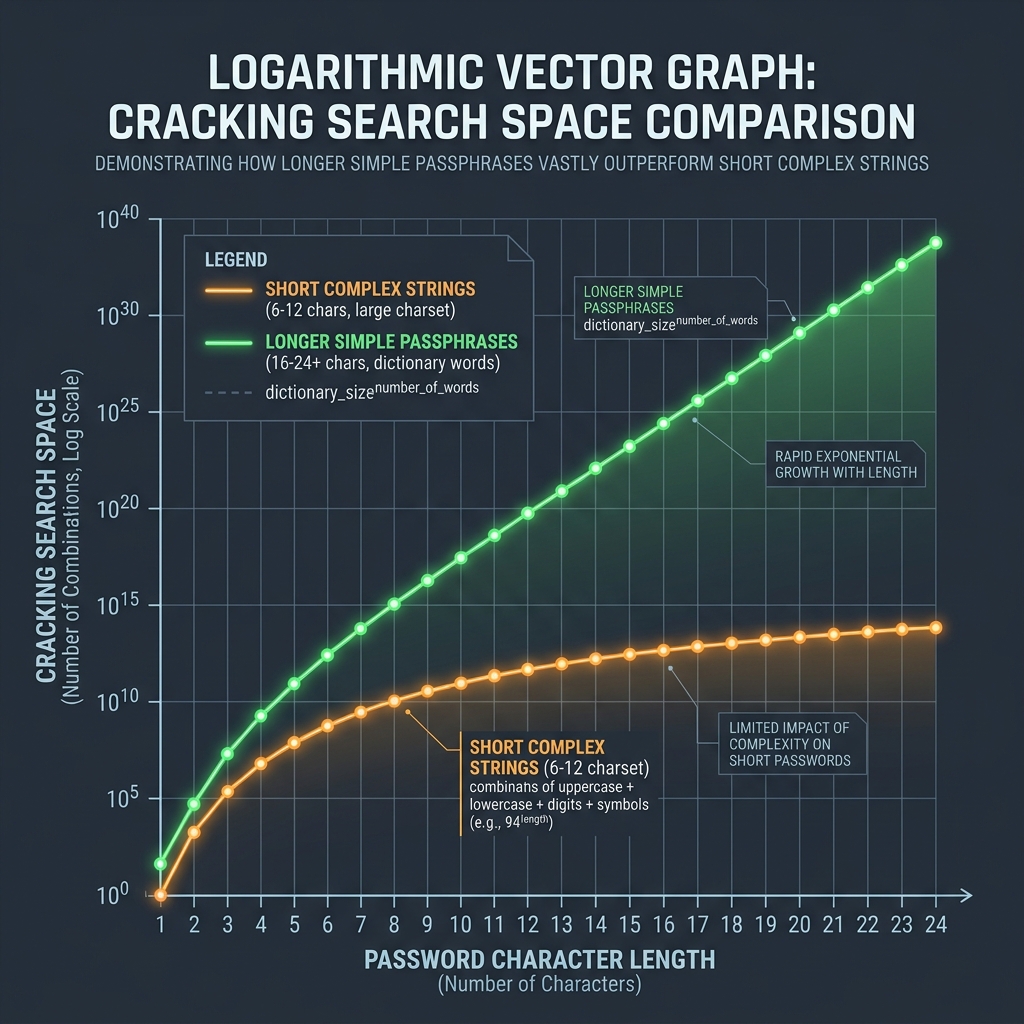
📊 Password Length and Entropy Reference
To protect your credentials from brute-force dictionary attacks, prioritize length over character complexity. Refer to the logarithmic scale chart below to see how length scales cracking difficulty:
🛡️ The Standalone Password Manager Advantage
Standalone password managers (like 1Password, Bitwarden, or KeePass) avoid this vulnerability by using a Zero-Knowledge Decryption Model:
- Isolated Key Derivation: Standalone managers derive the encryption key locally using PBKDF2 or Argon2 from your Master Password. (Read our KDF Iterations Security Guide).
- Independent Memory Space: The decryption key is held only inside the manager's process memory, which is protected from external access. Info-stealing malware cannot easily dump the credentials.
- (Read our Rainbow Table Salting Defenses Guide to review database protections).
- Generate High-Entropy Keys: Use our browser-only Secure Password Generator to create custom keys. Since all calculations execute in client-side memory, your keys are never sent to a database. (Read our Privacy Policy for data safety guarantees).
Join the Urbandigistore Hub
Subscribe to receive premium developer cheat sheets, advanced conversion techniques, and campaign optimization checklists. Zero spam, unsubscribe anytime.
🚀 Launch Interactive Tool
Ready to test this directly? Open the secure web tool in a new sandbox tab.