
Understanding PDF Structural Security: User Passwords vs. Owner Passwords
Discover the technical differences between PDF User and Owner passwords, and learn how encryption keys protect document permissions.
🔧 Interactive Utility Tool
Try the free, 100% secure client-side tool associated with this guide. No registration required.
PDF Structural Security: User vs. Owner Passwords
Managing digital documents requires strict compliance with formatting and font subsets. Here is a direct definition of this standard.
PDF (Portable Document Format) is a digital document standard designed to preserve formatting across all devices. Modern PDF operations utilize local browser APIs to merge, split, or secure pages without server uploads, protecting document data.
The PDF specification includes native security architectures that restrict access and usage. These restrictions are enforced using two distinct password categories: User Passwords and Owner Passwords. Under the hood, these passwords decrypt the document's structure using different security algorithms, granting or restricting permissions.
In this guide, we'll explain how these passwords differ, detail the encryption mechanics, and trace permission flags.
Product-Led CTA: Uploading sensitive contracts to cloud services poses severe privacy risks. Use our free, local Merge PDF Documents Tool or Split PDF Pages Tool to compile and split pages safely in memory.
🏛️ User Passwords vs. Owner Passwords
A secure PDF employs a dual-key security model:
🔑 1. User Password (Document Open Password)
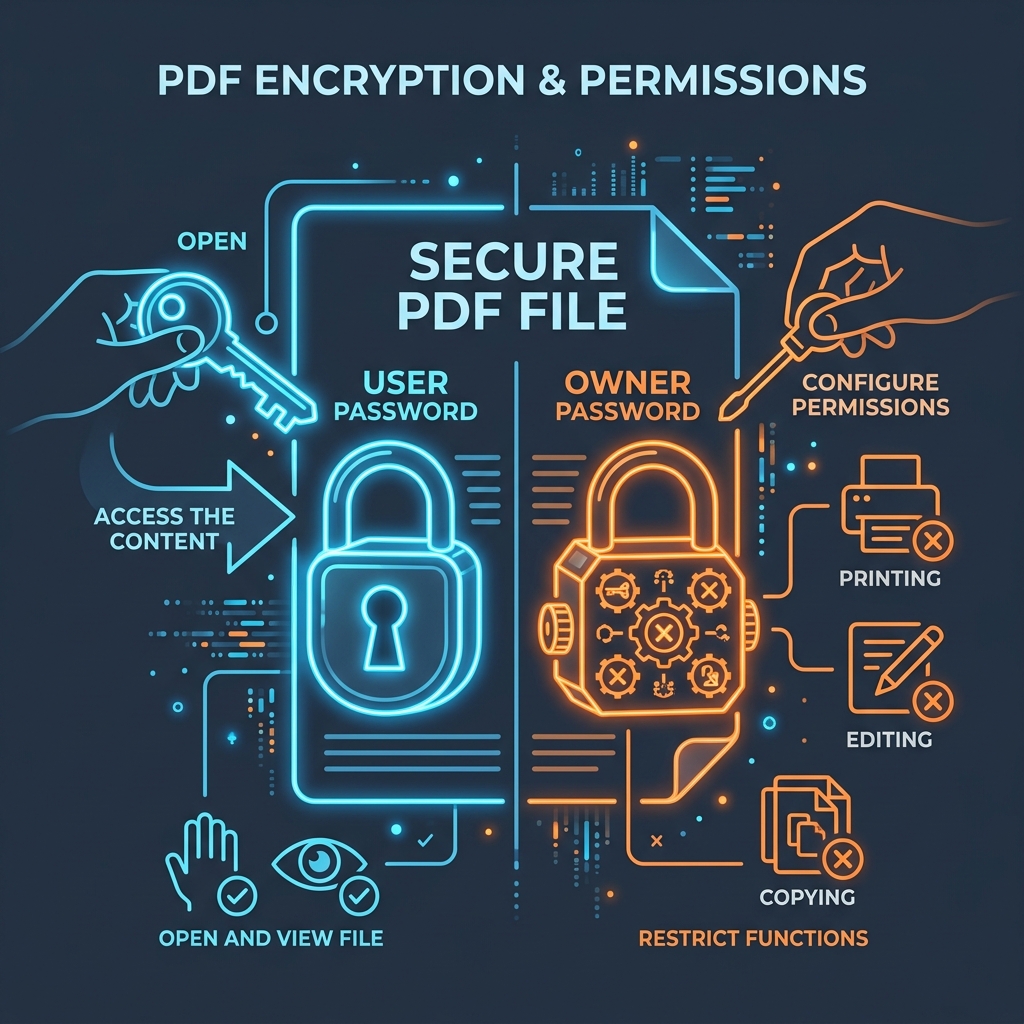
The User Password controls who can view the file. If set, the entire file body (excluding the encryption metadata catalog) is encrypted. * Decryption: A reader must provide this password to compute the decryption key and display the page streams.
⚡ Quick Action: Use the Online Tool
This guide pairs with our free, 100% secure client-side utility tool. Process your files or text instantly in-browser.
🔑 2. Owner Password (Permissions Password)
The Owner Password controls what actions a user can perform on the document (e.g., printing, editing, or copying text). * Enforcement: If the user provides the correct Owner Password, they can modify these restrictions. Otherwise, the reader software disables the restricted actions based on the document's permission flags.
📊 Document Security & Locking Reference
To visualize how encryption algorithms isolate access configurations and control permissions, refer to the security lock matrix below:
⚙️ Encryption Key Derivation (AES-128 vs. AES-256)
Modern PDFs use AES-256 (Advanced Encryption Standard with a 256-bit key) to secure file bodies:
- Salt and Hash: When a password is set, the PDF encoder generates a random 32-byte validation salt.
- Key Stretching: The password is hashed alongside the salt using SHA-256 (or PBKDF2 in Acrobat 9+) over thousands of iterations to resist brute-force attacks.
- Permission Validation: The generated key decrypts the document's permission bitflags (stored in the
/Pentry of the encrypt dictionary). - (See our PDF Security Permission Bitflags Guide to review restriction flags).
🚦 Streamlining Secure PDF Operations
When assembling files containing security parameters: * Merge Safely: Use our client-side Merge PDF Documents Tool to combine files locally without uploading decrypted documents to external servers. * Split Safely: Use our local Split PDF Pages Tool to extract specific ranges while maintaining appropriate security settings.
To learn more about document coordinates, read Understanding PDF Document Margins or review Understanding PDF Metadata and XMP Catalogs.
Join the Urbandigistore Hub
Subscribe to receive premium developer cheat sheets, advanced conversion techniques, and campaign optimization checklists. Zero spam, unsubscribe anytime.
🚀 Launch Interactive Tool
Ready to test this directly? Open the secure web tool in a new sandbox tab.